
You don’t file Form W-4 with the IRS, but your payroll depends on it. Employers use Form W-4 to determine how much to withhold from an employee’s gross wages for federal income tax. How familiar are you with the new W-4 form for 2026?
Don’t get caught out of the loop. Read on to learn about 2026 changes to the new W-4 form and what you need to know about 2020 and later versions of Form W-4.
- New 2026 W-4 adds a clear "Exempt from withholding" checkbox for employees with no federal tax liability.
- Deductions Worksheet expanded, now includes qualified tips and qualified overtime deductions from One Big Beautiful Bill Act.
- Step 3 split into 3(a) and 3(b); child credit for qualifying children under 17 increased from $2,000 to $2,200.
- Computational bridge lets employers convert pre-2020 W-4s to 2020+ format for consistent withholding calculations.
New W-4 form 2026: Changes
So, what’s new with the 2026 W-4 form? There are a few changes you should know about:
- New checkbox for “Exempt from withholding”
- 2026 updates to the Deductions Worksheet
- Step 3 (Claim Dependent and Other Credits) updates
1. New checkbox for “Exempt from withholding”
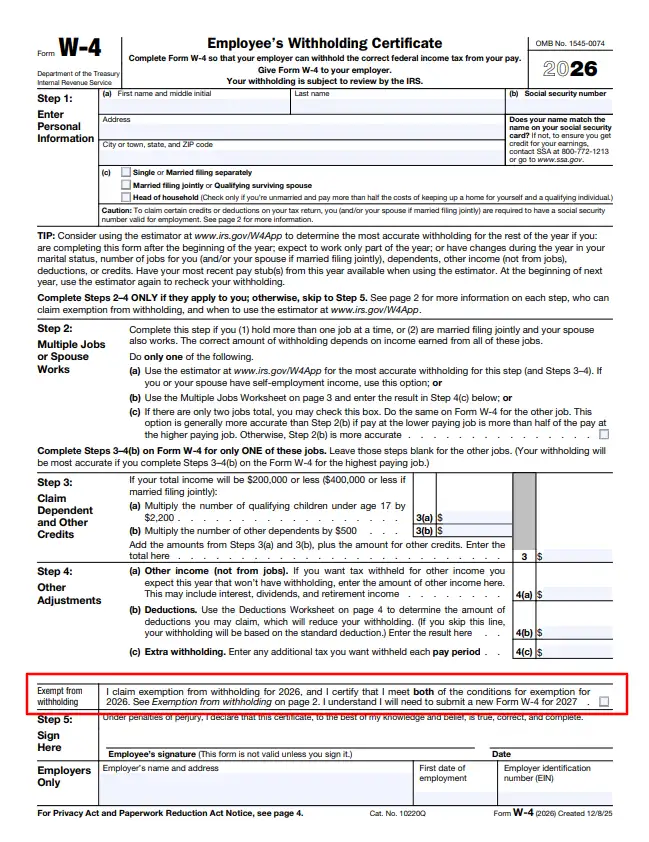
There is a new checkbox for employees who are exempt from federal income tax withholding.
Prior to the new 2026 W-4 form, employees who had no federal income tax liability had to write “Exempt” in the space below Step 4. Employees could claim exemption if they had no federal income tax liability in the previous year and expected to have no federal income tax liability in the current year.
Now, employees simply check the box that says “I claim exemption for withholding for 2026, and I certify that I meet both of the conditions for exemption for 2026.”
2. 2026 updates to the Deductions Worksheet
Each year, the IRS updates the amounts on the Deductions Worksheet. In addition to updating these amounts, there are new changes to the worksheet in response to the One Big Beautiful Bill Act.
Among other changes, there are now line items in Step 4(b) of the Deductions Worksheet for:
- Qualified tips: Due to the new “no tax on tips” rule in the One Big Beautiful Bill Act, employees can deduct cash tips from federal income tax. Employees who expect to benefit from this new deduction can adjust their federal income tax withholding on Form W-4.
- Qualified overtime compensation: Due to the new “no tax on overtime” rule in the One Big Beautiful Bill Act, nonexempt employees can now deduct overtime premiums from federal income tax. Employees who expect to benefit from this new deduction can adjust their federal income tax withholding on Form W-4.
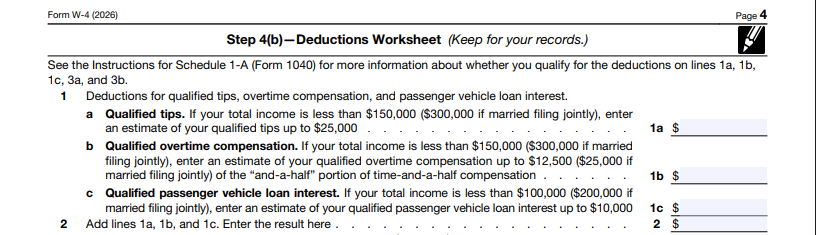
Keep in mind there are other changes to Step 4(b) of the Deductions Worksheet. In fact, the expanded worksheet is now a page long!
3. Step 3 (Claim Dependent and Other Credits) updates
Step 3 has now been broken down into Step 3(a) and Step 3(b). The amount employees can claim for qualifying children under the age of 17 has also been adjusted from $2,000 to $2,200.

2020 W-4 and later versions: Overview
In 2020, the IRS released the long-awaited new federal W-4 form, changing how employers handle income tax withholding. Because the IRS only made the new form mandatory for new hires and employees making Form W-4 changes, some employers might need to familiarize themselves with it. And, your employees should know how to fill out Form W-4.
Other employers are a little too familiar with the new IRS W-4 form and the old version. It can be difficult juggling both 2019 and earlier Forms W-4 with 2020 and later forms. To combat this, the IRS provides an optional computational bridge.
The “new” Form W-4, Employee’s Withholding Certificate, is an updated version of the previous Form W-4, Employee’s Withholding Allowance Certificate. The IRS launched this form in 2020, removing withholding allowances. The new IRS Form W-4 complements the changes to the tax law that took effect in 2018. This new design aims to simplify the process of filling out Form W-4 for employees and improve tax withholding accuracy.
Here’s a quick rundown of the two significantly different versions of the form:
- 2020 and later Forms W-4: “New version” without withholding allowances
- 2019 and earlier Forms W-4: “Old version” with withholding allowances
New hires who receive their first paycheck after 2019 must use the 2020 and later versions of Form W-4 when they begin working at a business.
On the form, employees enter their contact information and Social Security number, report their filing status, and claim dependents.
Your other employees don’t need to fill out the new W-4 form. However, employees who want to update their withholdings or change W-4 forms must use the 2020 and later versions.
1. What’s the difference between the old W-4 vs. new W-4 form?
There are a few changes with the Form W-4 2020 and later versions that go beyond having a new name and layout. You and your employees should understand how to fill out a Form W-4 2026.
The 2026 W-4 form, is divided into five steps:
- Enter Personal Information
- Multiple Jobs or Spouse Works
- Claim Dependent and Other Credits
- Other Adjustments
- Sign Here
The IRS only requires that employees complete Steps 1 and 5. Steps 2 – 4 are reserved for applicable employees.
Like previous versions of the form, there is a multiple jobs worksheet and deductions worksheet on the new form.
But unlike 2019 and earlier versions, the new form doesn’t have withholding allowances. Employees can no longer claim withholding allowances to lower their federal income tax withheld.
So, how does the new W-4 withholding work? Now, employees who want to lower their tax withholding must claim dependents (Step 3) or use the deductions worksheet and enter the amount in Step 4(b).
Employees can also request employers withhold more in taxes in Step 4(a) and 4(c). If an employee requests extra withholding each pay period, make sure to account for that amount.
Checking the box in Step 2 also increases the amount of federal income tax withholding. Employees check this box if they work two jobs simultaneously or if both they and their spouse work.
2. What’s the purpose of the redesign?
The 2020 and later Form W-4 versions are intended to better match the changes from the Tax Cuts and Jobs Act. The new form supports withholding table bracket updates.
Another reason for the redesigned form is ease of use. The IRS hopes that the new W-4 form will be easier for employees (and employers) to understand. And, the form is supposed to boost tax withholding accuracy.
3. Are withholding allowances still gone?
Yes, withholding allowances are gone. Employees filling out the 2026 Form W-4 still cannot claim withholding allowances.
4. Which withholding table should you use?
There are two methods for calculating federal income tax withholding: percentage and wage bracket methods. Knowing which one to use is a key part of your payroll and HR processes.
But because of the two versions of Form W-4, there are even more income tax withholding tables to choose from. IRS Publication 15-T has tables that work with withholding allowances for pre-2020 W-4 forms. Some tables correspond with the 2020 and later Forms W-4. And, there is a table for automated payroll systems.
So, which do you pick? The table (or tables) you use may depend on:
- Whether you use a manual or automated payroll system
- Which form version you have in your records
- Whether you prefer the wage bracket or percentage method
If you use an automated payroll system, the system should use the following table, regardless of which version of Form W-4 you have on file:
- Percentage method tables for automated payroll systems
If you use a manual payroll system and have 2020 and later W-4 forms on file, choose between the following tables:
- Wage bracket method tables for manual payroll systems with Forms W-4 from 2020 or later (cannot use this method if the employee earns over $100,000)
- Percentage method tables for manual payroll systems with Forms W-4 from 2020 or later
If you use a manual payroll system and have 2019 and earlier W-4 forms on file, choose between the following tables:
- Wage bracket method tables for manual payroll systems with Forms W-4 from 2019 or earlier (cannot use this method if the employee earns over $100,000 or claims more than 10 allowances)
- Percentage method tables for manual payroll systems with Forms W-4 from 2019 or earlier
- Say goodbye to using withholding tables
- Enjoy accurate payroll calculations
- Run payroll in 3 easy steps

5. What’s the difference between “Standard” vs. “Checkbox” rates?
When using the 2020 and later income tax withholding tables, you’ll see two rate schedules: 1) “Standard Withholding” rate and 2) “Form W-4, Step 2, Checkbox Withholding” rate.
Use the Standard rate if employees only fill out Steps 1 (Enter Personal Information) and 5 (Sign Here).
Use the Checkbox rate if the employee checks the box in Step 2 (Multiple Jobs or Spouse Works).
6. Do all employees need to fill out a new W-4 form each year?
No. An employee must fill out the 2026 W-4 form if they:
- Are a new hire OR
- Decide to change their withholdings
7. What is the computational bridge?
Maybe you have both the “old” and “new” versions of the W-4 form on file. If you don’t like using two separate sets of rules (and income tax withholding tables), you might be interested in the IRS’s computational bridge released in 2021.
The computational bridge is a four-step method employers can use to “convert” 2019 and earlier forms to 2020 and later W-4 forms for income tax withholding consistency. The IRS released the computational bridge in 2021. It is completely optional.
Use the computational bridge to treat all Forms W-4 like the 2020 and later versions. This option lets employers who use manual payroll systems stick to one income tax withholding table.
If you use the computational bridge, gather the 2019 and earlier W-4 form and a fresh 2020 and later form. Then, make the following four adjustments:
- Find the employee’s checked marital status on Line 3 (2019 and earlier Form W-4). Then, choose a filing status in Step 1(c) (2020 and later Form W-4) that reflects this marital status:
- “Single” >> “Single”
- “Married, but withhold at higher single rate” >> “Married, filing separately”
- “Married” >> “Married filing jointly”
- Enter an amount in Step 4(a) (2020 and later Form W-4) based on the filing status you selected:
- $8,600: “Single or “Married filing separately”
- $12,900: “Married filing jointly”
- Multiply the number of withholding allowances claimed on Line 5 (2019 and earlier Form W-4) by $4,300. Enter the total into Step 4(b) (2020 and later Form W-4)
- Enter any additional withholding amounts the employee requested on Line 6 (2019 and earlier Form W-4) into Step 4(c) (2020 and later Form W-4)
Help! I need a computational bridge example
Let’s go through the computational bridge, step by step. Say the employee marked “Single” on the 2019 and earlier Form W-4, claimed 1 withholding allowance, and did not request any additional withholding amounts. Fill out the latest W-4 form, which is the 2026 Form W-4.
Here’s how the computational bridge would look in action:
- The employee’s filing status on the 2026 Form W-4 would be “Single”
- Enter $8,600 into Step 4(a) on the 2026 Form W-4
- Multiply the employee’s claimed withholding allowance (1) by $4,300 to get $4,300. Enter $4,300 into Step 4(b) on the 2026 Form W-4
- Because the employee did not claim any additional withholding amounts, you do not enter anything into Step 4(c)
Here’s an example of W-4 form filled out using the computational bridge:
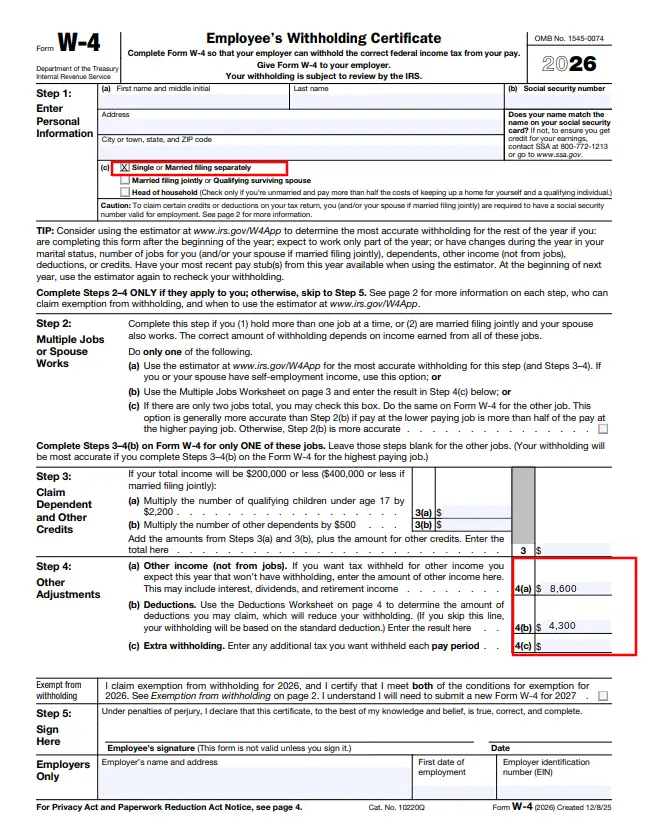
Now, you can use either the wage bracket or percentage method income tax withholding table for Forms W-4 from 2020 or later. To do so, simply refer to the “converted” 2026 Form W-4.
Remember, this is only for the purpose of figuring federal income tax withholding. The new form you create does not replace the 2019 and earlier Form W-4 the employee completed. Keep both forms in your records.
If the employee ends up furnishing a new form, stop using the computational bridge for that employee.
8. What happens if a new hire doesn’t fill out a new W-4?
Treat new hires who do not fill out the new form as single filers with no other adjustments. Use the standard withholding rate for these employees.
9. Can employers force employees to submit a new form?
Although you can ask your employees with 2019 and earlier W-4 forms to submit a new form, you cannot force them to.
If you ask your employees to fill out a new W-4 form and they are not required to, you must explain two things:
- They are not required to do so
- Their withholding will continue to be based on their previously submitted Form W-4 if they do not fill out the 2020 or later version
Again, you can’t force employees to fill out a new form. And if these employees refuse to do so, you must continue using their previous form (but you can use the computational bridge, if desired!).
10. What does the new W-4 form look like?
You can view the full 2026 W-4, Employee’s Withholding Certificate, on the IRS’s website. And if you want to see the 2019 and earlier version, you can check it out here.
This article has been updated from its original publication date of December 18, 2019.
This is not intended as legal advice; for more information, please click here.