HR compliance can be a nightmare for overwhelmed small business owners. You need buttoned-up HR processes to avoid compliance-related penalties and lawsuits. This takes time, which is a commodity most business owners don’t have.
Is it possible to streamline your HR processes to stay compliant with federal, state, and local regulations?
Yes. And we’re going to show you how.
Quick answer: 7 proven ways to simplify HR
- Standardize with HR templates for policies, forms, and letters.
- Get personalized alerts for law changes (federal, state, local).
- Auto-create compliant benefits documents (e.g., POP and wrap SPD).
- Build and update your employee handbook with a guided tool.
- Use curated HR resources (checklists, guides, videos) to stay current.
- Store employee files and documents online for secure, paperless access.
- Generate required HR reports (e.g., EEO-1, VETS-4212, new hire) with software.
What does human resources do?
Human resources manages and supports your business’s workforce in all areas from recruitment to legal compliance.
Human resources responsibilities include:
- Policy development
- Recruitment
- Onboarding and training
- Compensation, benefits, and payroll
- Labor law, health and safety, and recordkeeping compliance
- Performance management
- Retention
Keeping up with HR tasks requires a set of processes, skills, and knowledge. Whether you’re a small business owner wearing multiple hats or a seasoned HR professional, you can take steps to simplify and streamline your responsibilities.
How to streamline HR processes: 7 practical steps
Simplify HR processes to enhance efficiency, improve employee satisfaction, and reduce administrative headaches.
Check out the following seven tips to get started.
Want to keep even more of your time? Use human resources software with HR compliance tools so you can do the following in one convenient location.
How to streamline HR processes
- Use HR templates
Look for reputable sources that offer customizable policies, forms, and letters to help you manage benefits, hiring, termination, and more.
- Set up personalized alerts for law changes
Set up personalized email alerts for federal, state, and local law changes that impact your business.
- Use a benefits document creator
Use a benefits document creator to create documents (e.g., premium only plan and wrap summary plan descriptions) that comply with federal requirements.
- Use an employee handbook builder
Use an employee handbook builder to simplify and streamline the process of creating, managing, and updating your document.
- Take advantage of HR resources
Use checklists, how-to guides, webinars, and videos to help you stay compliant.
- Manage paperless files and documents online
Consider managing paperless files and documents (e.g., benefits documents, position history, emergency contacts, and your employee handbook) online for increased convenience and access.
- Generate HR reports
Use HR software to generate reports such as new hire, retirement plan, equal employment opportunity, and VETS reports.
1. Use HR templates
HR documents are unavoidable in business. But instead of drafting these from scratch or hiring a lawyer, consider using HR document templates.
Look for reputable sources that offer customizable policies, forms, and letters. For example, you can use a bereavement time off policy template, a non-disclosure statement form, or a salary increase letter.
Depending on what HR solution you use, you can find templates for all HR compliance areas such as:
- Benefits
- Discrimination and Equal Employment
- Hiring
- Time off
- Employee management
- Safety and health (e.g., workplace injury prevention)
- Termination
- Wage and hour
2. Set up personalized alerts for law changes
Federal, state, and local laws are ever-changing. But who has time to scour the news daily or comb through pages of legislation to see what it all means?
Business owners don’t have the time, that’s for sure.
Solo, you may struggle to keep up with changing minimum wage, paid sick time, paid family leave rules, and other law updates.
Instead, set up personalized email alerts for federal, state, and local law changes that impact your business. You can use tools like an HR system with a compliance dashboard to streamline these HR responsibilities.
3. Use a benefits document creator
Benefits are key for recruitment and retention, especially since 81% of employees value them.
Creating an employee benefits package is great. But creating compliant benefits documents can be … not so great for a busy business owner.
Use a benefits document creator to create documents that comply with federal requirements.
For example, you can create benefits documents like:
- Premium only plan (POP) document to comply with IRS requirements
- Wrap summary plan description (SPD) to meet ERISA disclosure requirements
4. Use an employee handbook builder
Your company’s employee handbook is the set of rules and procedures your workforce must follow. Your handbook should detail your code of conduct, employment laws, pay frequency, attendance, time-off policy, benefits, and more.
Creating an employee handbook is a non-negotiable. However, drafting a handbook from scratch can take weeks or even months.
Use an employee handbook builder to simplify and streamline the process. Easily create, manage, and update your company’s compliant employee handbook.

Get access to HR templates, personalized alerts for law changes, an employee handbook builder, and more with Patriot’s HR software.

5. Take advantage of HR resources
HR compliance can be a tricky thing. Take advantage of HR resources like checklists, how-to guides, webinars, and videos for support.
6. Manage paperless files and documents online
There are files galore in HR. Benefits documents, position history, emergency contacts, and your employee handbook are just some of the files you need to store.
Relying on paper files leaves room for disorganization, security concerns, and misplacement. Consider managing paperless files and documents online for increased convenience and access.
7. Generate HR reports
One of your time-consuming human resources tasks is preparing HR reports, like EEO-1 and VETS-4212.
HR reports—a feature in many HR software solutions—simplify required reporting such as:
- New hire reporting
- Retirement plan reporting and disclosure
- Equal employment opportunity reporting
- VETS reporting
Can HR software simplify HR tasks? Yes: Here’s how
HR software for small business has the features to streamline HR processes and help you comply with labor laws, recordkeeping requirements, reporting requirements, and more. Other benefits include standardizing procedures and improving onboarding, training, and data management.
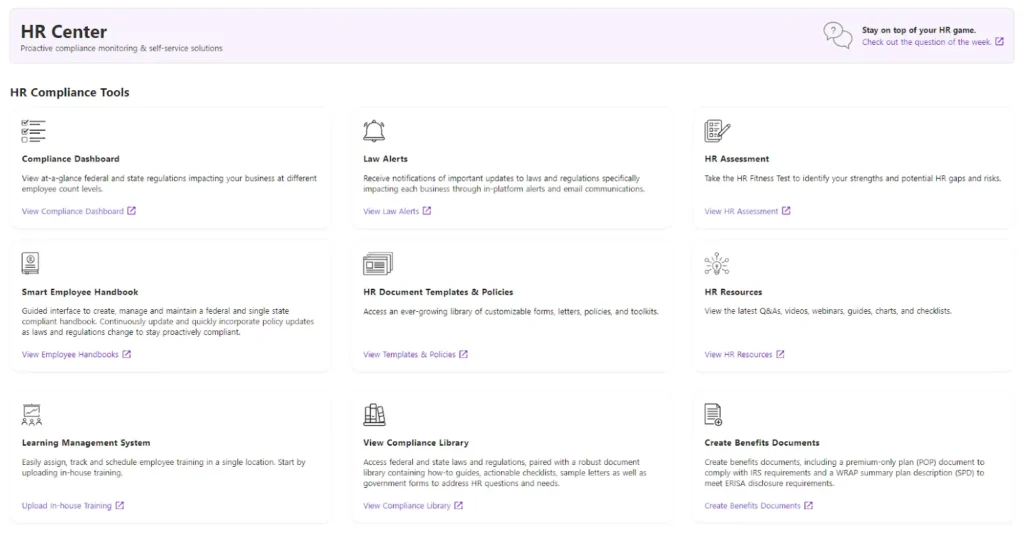
Use HR software with the employee management and compliance features like:
- HR reports
- Compliance dashboard
- Employee handbook builder
- HR document templates
- HR resources
- Employee self-service (e.g., pay stubs, document acknowledgments) and mobile access)
- Integrations with payroll and time tracking software
- HR compliance library
- Benefit documents creator
- Learning management system
- Law alerts
- HR assessment
You can also take HR assessments to monitor your business strengths and spot potential compliance risks.
If you run a healthcare facility: Streamline HR and payroll
Healthcare payroll and HR can be uniquely complex due to:
- Variable pay structures (shift differentials, on-call/holiday premiums, bonuses, travel stipends).
- Multiple departments/locations requiring accurate time capture and cost allocation.
- A mix of W‐2 employees and 1099 clinicians/contractors.
- Union rules, multi-state/local taxes, and frequent onboarding/offboarding.
What to prioritize in solutions
- Automate complex pay calculations for hourly rates, premiums, overtime, and bonuses.
- Integrate payroll and time tracking to reduce manual entry and errors.
- Ensure multi-jurisdiction tax support and automatic updates for regulation changes.
- Provide employee self-service/mobile access for pay stubs, time approvals, and document
- acknowledgments.
- Centralize reporting.
Best fit guidance
- Small clinics or practices: Look for streamlined payroll with contractor support.
- Multi-department facilities: Prioritize payroll integration and differential pay automation.
- Home health and distributed teams: Emphasize mobile access, multi-state compliance, and fast off-
cycle payments.
Pro Tip: Pair Patriot’s payroll and HR add-on so you can store paperless employee files, use templates and an employee handbook builder, receive law alerts, and generate required reports all from one place.
How to choose HR software: Quick decision checklist
- Team profile: How many employees vs. contractors? Any union or shift differential needs?
- Compliance scope: Single or multiple states? Industry-specific considerations, such as healthcare payroll software?
- Integrations: Do you need time tracking or accounting integrations?
- Access: Do managers and employees need mobile self-service?
- Reporting: Which reports are mandatory (e.g., EEO-1, VETS-4212, new hire), and which would inform budgeting?
- Ease and speed: Can you run payroll quickly and handle off-cycle runs without spending extra (i.e., unlimited payrolls)?
- Support and resources Is there an HR compliance library, templates, and alerts to keep you current?
FAQs
Standardize documents with templates, move files online, and use HR software for alerts and reporting. This cuts manual work and reduces compliance risk.
Set personalized alerts for federal, state, and local updates, and use an HR compliance dashboard that summarizes what’s changed and why it matters.
Benefits documents (e.g., POP, wrap SPD), signed policies, I‐9 and W‐4 forms, job descriptions, position history, emergency contacts, training records, and your employee handbook.
Look for a builder that makes it easy to create, manage, and update a compliant employee handbook specific to your business.
Payroll calculates and pays wages and taxes; HR systems manage people data, documents, policies, onboarding, training, and reporting. Many small businesses use both together.
Differential pay automation, time integrations, multi-state tax support, contractor payments, and centralized reporting are important for healthcare. Mobile self-service is also helpful.
Software standardizes processes (templates, handbook), tracks required data, auto-updates for regulation changes, generates required reports, and provides alerts and an HR compliance library.
This article has been updated from its original publication date of August 14, 2024.
This is not intended as legal advice; for more information, please click here.