
If you’re thinking about hiring employees, you need a plan for payroll. But with the added expense of wages and benefits, you might not be too keen on the high price tag that comes with outsourcing payroll. Fear not; you can learn how to do payroll yourself. Here’s what to gather, the steps to follow, and how to decide between manual payroll, payroll software, or outsourcing.
- Gather required IDs and employee forms first: FEIN/EIN, state tax IDs, completed W-4s, I-9s, and follow state new-hire reporting rules.
- Follow the five-step payroll cycle: track time, calculate gross pay, apply pre-tax and post-tax deductions, withhold/pay taxes, and distribute net pay.
- Choose a payroll cadence that meets state pay frequency laws, and set a consistent approval process for time and pay.
- File and deposit payroll taxes on schedule (e.g., Forms 941/944, 940, W-2/W-3, 1099-NEC) and keep payroll records as required.
- Choose method wisely: manual saves money but risks errors; payroll software automates calculations and tax filings for a fee.
What information do you need for payroll?
When you do your own payroll, you can either do everything manually or use payroll software. Regardless of which method you choose, you must start by gathering some information to calculate hours worked.
To run payroll for your employees, you first need information such as:
- Federal Employer Identification Number (FEIN)
- Tax rates (e.g., SUTA tax rate)
- Employee information (e.g., pay rate and withholding information)
- Completed Form W-4 for each employee (federal income tax withholding) and any state withholding forms (if applicable).
- Form I-9 verification for work authorization (retain per federal rules).
- State employer registrations (withholding and unemployment) and any local tax IDs.
- State new-hire reporting submitted within your state’s deadline.
- Chosen pay frequency and pay dates compliant with your state’s pay frequency laws.
- Timekeeping method (e.g., time clock, timesheets) with an overtime policy that follows FLSA/state rules.
- Worker classification decisions (W-2 employee vs. 1099 contractor) documented.
- Bank/direct deposit setup and a process for checks if using paper pay.
- A process to store pay stubs and payroll records securely for required retention periods.
How to do payroll yourself
You might be wondering, Can I do payroll myself? Will I be more prone to errors? How much time will doing my own payroll take? Will I still be able to keep up with payroll trends?
Read on to learn about the tasks, time commitments, and costs involved with doing payroll manually and using payroll software.
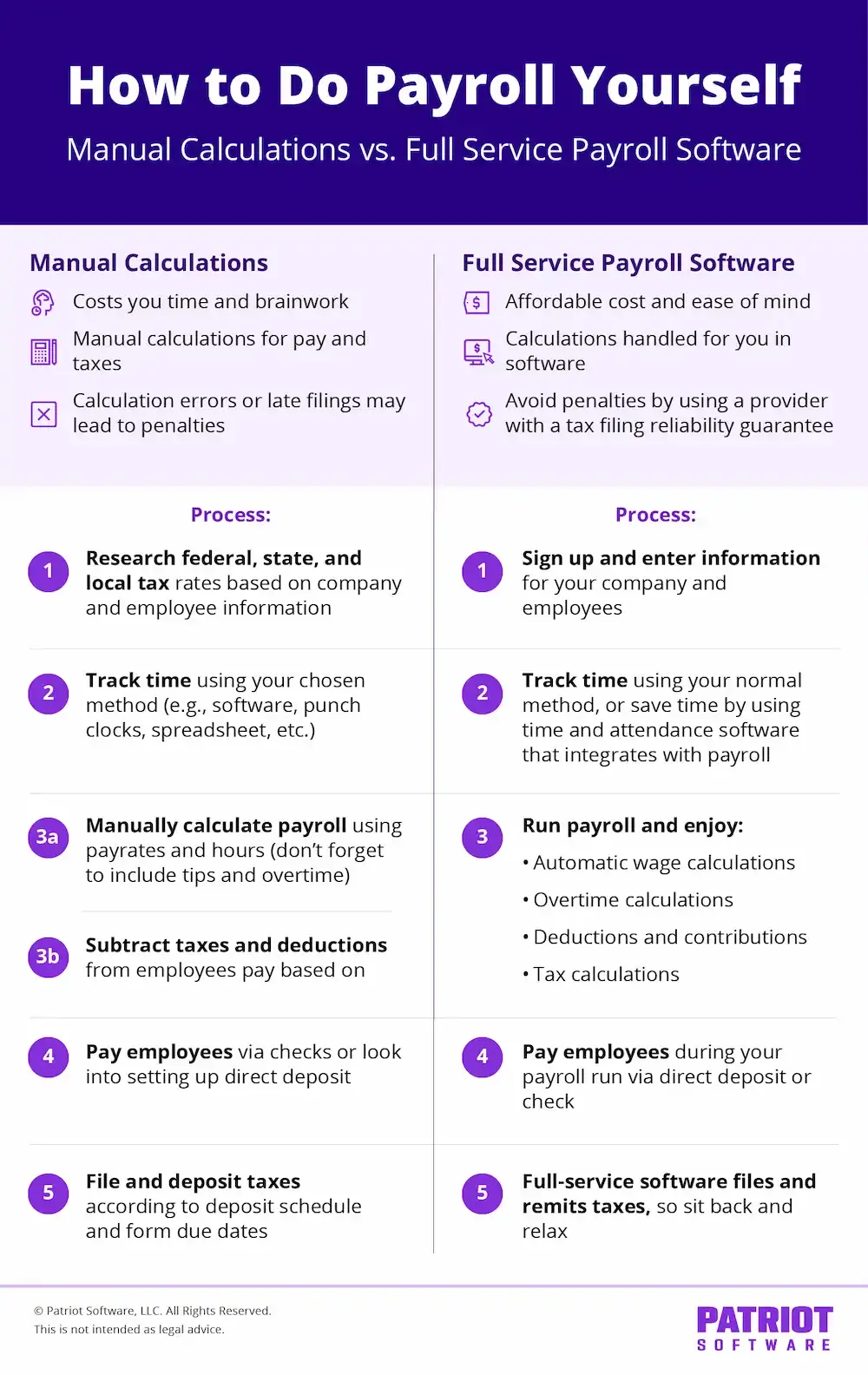
How to do payroll yourself: Manually do calculations
If you’re willing to read up on tax laws and do your own calculations, you might be interested in learning how to do your own payroll.
Doing payroll by hand is the least expensive payroll option. You don’t have to pay a professional or purchase a program.
When you manually run payroll, you have full control over your payroll. You know when and how your payroll is completed. But, doing payroll yourself likely means you don’t have someone to check your calculations. There is an increased chance of errors, which are often followed by penalties.
Doing payroll by hand also takes time. You have to do all the calculations, distribute wages, and file taxes. You could spend a lot of time working on payroll instead of working on your business. Manual payroll is best for very small teams with simple pay structures and limited deductions; plan extra time for setup, calculations, and tax deposits.
How to manually do calculations for payroll
Want to do your own payroll, without any software? Take a look at the steps you have to follow for manual payroll:
How to do payroll yourself manually
- Track time
Use an attendance management method to track employee time. Or, you could have employees track their own time. Then, you can approve it.
Confirm nonexempt vs. exempt status. For nonexempt employees, track regular and overtime hours per FLSA/state rules.
Approve time by a consistent cut-off so you can process payroll on time. - Calculate payroll
At the end of each pay period, use employee time cards and their rates of pay to calculate wages.
Include all types of compensation, including any tips and overtime for the pay period.
Gross pay basics: Hourly gross = hours x hourly rate (+ overtime premium). Salary gross = annual salary / number of pay periods.
Add other earnings: bonuses, commissions, shift differentials, tips, reimbursements (if taxable), and any retro pay.
Apply the correct overtime rate (typically 1.5x) on eligible hours as required by federal or state law. - Subtract deductions
Begin by subtracting pre-tax deductions.
Next, deduct employment taxes.
Finally, withhold post-tax deductions.
Typical order: pre-tax benefits (e.g., Section 125), then taxes, then post-tax deductions (e.g., garnishments).
Employee taxes usually include federal income tax (based on W-4), Social Security and Medicare (FICA), applicable state and local taxes.
Calculate employer taxes: your share of FICA, FUTA, SUTA, and any local employer taxes (paid by the employer, not withheld from employees).
Provide a pay stub showing hours, gross pay, deductions, taxes, and net pay where required. - Pay employees
Distribute take-home pay to employees using your designated method (e.g., direct deposit).
Ensure funds are available for net pay and upcoming tax deposits.
Follow state rules on final pay, pay stub format, and permitted payment methods. - File and deposit taxes
File and remit employment taxes according to your deposit schedule and form due dates.
Deposit federal income tax and FICA via EFTPS on your assigned monthly or semiweekly schedule.
File quarterly Form 941 (or annual Form 944, if eligible) and annual FUTA Form 940.
File/submit state and local withholding and unemployment returns and payments as required.
At year-end, issue Forms W-2 to employees and file with the SSA; issue Forms 1099-NEC to contractors when applicable.
Retain payroll records (timecards, pay stubs, tax filings) per federal/state retention rules.
How to do payroll yourself: Purchase payroll software
Payroll software is a great middle-ground option for doing your own payroll. Online payroll software is relatively inexpensive and can greatly reduce payroll costs if you outsource to a professional employer organization (PEO). Not to mention, the software does all the calculations for you, so you don’t have to worry about mathematical errors.
With payroll software, you remain in control while processing payroll. You get to be in charge, and you know exactly when payroll is done.
Several factors go into knowing how to choose a payroll service. For example, there might be a learning curve for you to get the hang of the software.
Payroll software requires a small time commitment. The time commitment is less than what you would spend on manual calculations. And if you purchase a tax filing service, the software takes care of all tax obligations for you. You won’t have to worry about withholding, filing, and remitting taxes, saving you even more time.
- Best for: teams that want accuracy and time savings without fully outsourcing; businesses with multiple states, benefits, or frequent changes.
- Typical pricing: a base monthly fee plus a per-employee charge; full-service plans often include tax filings and year-end forms.
- What to look for: automated tax calculations and filings, direct deposit, employee self-service, new-hire reporting, time tracking integrations, multi-state support, and accessible customer support.

- Easy onboarding with our setup wizard
- Free USA-based support
- Run payroll in 3 easy steps

Payroll software options for small businesses
Examples of widely used payroll software include Patriot Payroll, Gusto, QuickBooks, SurePayroll, and OnPay. Each offers core payroll, direct deposit, and automatic tax filings with full-service plans.
You can view our list of best payroll software for small businesses to view pros and cons of each.
How to use payroll software
If you’re interested in learning how to do payroll yourself but also want a streamlined process, consider software. Here are the steps to use payroll software:
- Purchase reliable payroll software.
- Enter your business and employee information.
- Have employees track their time worked each pay period.
- Run payroll and distribute wages. The software handles calculations for you.
- File and remit taxes. If you use full-service payroll software, you can skip this step because the software company will do this for you.
Some payroll systems include payroll automation (aka auto payroll features) that lets you set up the account, schedule payroll, and let the system automatically run each pay period. Look for software with an automated payroll feature to get started.
Payroll software includes detailed payroll reports that give you valuable insights into your payroll expenses and other key information. Analyze payroll data to improve decision-making.
Can you do your own payroll?
You now know how to run your own payroll. If you’re still not sold on being able to handle it on your own, you might opt to outsource payroll to a professional employer organization (PEO) or accountant.
Accountants and PEOs are trained professionals who can run payroll for you. After you hand over employee information and time cards, your payroll professional will handle the rest.
Keep in mind that expertise comes with a cost. Outsourcing payroll is the most expensive out of all your payroll processing options.
When DIY makes sense:
- Simple pay structures (hourly/salary), few benefits, one or two states.
- You have reliable time tracking and can commit a regular block of time each pay period.
- You’re comfortable following deposit schedules and filing deadlines.
When to consider outsourcing:
- Complex multi-state taxes, many benefits/garnishments, or rapid growth.
- Limited time or comfort with compliance; prior penalty issues.
- Desire for HR support bundled with payroll (often via PEOs).
Time estimates:
- Manual: plan 1–3 hours per pay run for very small teams (more with complexities).
- With payroll software: often a few minutes per run once set up depending on the software provider (for example, Patriot customers average less than three minutes to run a payroll); full-service handles filings.
Required payroll forms and deadlines (overview)
This is a general guide; always verify your specific federal, state, and local requirements.
- At hire: Form W-4 (employee withholding), Form I-9 (employment eligibility within 3 business days), state withholding forms (if any), state new-hire reporting (deadline varies by state).
- Ongoing deposits: Federal income tax and FICA via EFTPS on monthly or semiweekly schedules assigned by the IRS; state/local deposits per your state/local rules.
- Quarterly federal returns: Form 941 due by the last day of the month following the quarter (Apr 30, Jul 31, Oct 31, Jan 31).
- Annual federal returns: Form 940 (FUTA) generally due Jan 31.
- Year-end forms: Provide and file Forms W-2/W-3 to employees/SSA by Jan 31; issue 1099-NEC to contractors by Jan 31 when applicable.
- State/local filings: State withholding/unemployment returns and payments on state schedules; some localities require separate returns.
- Recordkeeping: Keep payroll records (timecards, wage rates, tax forms) per federal and state retention rules.
Common payroll mistakes to avoid
- Misclassifying workers (contractor vs. employee) or exempt vs. nonexempt status.
- Missing state registrations or local taxes before first payroll.
- Using the wrong pay frequency for your state or paying late.
- Calculating overtime incorrectly or excluding nondiscretionary bonuses from overtime.
- Withholding the wrong tax amounts due to outdated W-4/state forms.
- Missing deposit deadlines (EFTPS) and quarterly/annual filings.
- Not issuing required pay stubs or keeping inadequate records.
FAQs about doing payroll yourself
Yes. Employers can run payroll in-house if they follow all tax, wage, and reporting laws.
Manual processing for a small team can take 1–3 hours per run. With payroll software, many runs typically take anywhere from a few to 30 minutes after setup. Full-service plans handle tax filings.
Calculation errors, missed deposit deadlines, or misclassification can lead to penalties and interest. Software reduces risk by automating calculations and schedules.
Yes. You need an EIN and typically state withholding and unemployment registrations before your first pay run.
Employees receive wages with taxes withheld and a W-2 at year-end; contractors are paid without withholding and may receive a 1099-NEC if they meet reporting thresholds. Classification depends on the nature of the work relationship.
Use a pay frequency allowed in your state (e.g., biweekly, semimonthly). Choose one that aligns time tracking, approvals, and cash flow.
Yes. You’ll import prior wage and tax data (year-to-date) and verify tax accounts. Full-service providers can help with setup and filing going forward.
This article has been updated from its original publication date of September 7, 2016.
This is not intended as legal advice; for more information, please click here.