
New employee forms are a staple of the onboarding process. Before an employee can legally begin working for your business, they need to fill out required forms. What forms do new employees need to fill out, and when are they due?
Quick answer: New hire forms checklist and deadlines
- Required for all employees
- Form I-9 (Employment Eligibility Verification)
- Employee completes Section 1 no later than the first day of work
- Employer reviews documents and completes Section 2 within three business days of the employee’s first day
- Retain I-9 for three years after hire date or one year after termination, whichever is later
- Form W-4 (Federal Withholding)
- Due before the first payroll is processed
- If an employee doesn’t submit a W-4, withhold as single with no adjustments under current IRS guidance
- State W-4 (if your state has income tax)
- Due before the first payroll is processed
- Form I-9 (Employment Eligibility Verification)
- Common employer business forms (timing is during onboarding, before first payroll if applicable)
- Direct deposit authorization
- Emergency contact
- Employee handbook acknowledgment
- Benefits enrollment/waiver forms (if offered)
- Keep forms for your records (do not send W-4s to the IRS unless requested)
What forms do new employees need to fill out?
The government requires some new hire forms. Others are necessary documents you need for your business.
Take a look at the federal employment eligibility form employees must fill out:
- Form I-9
Employees also need to fill out income tax forms so you can accurately run payroll:
- Form W-4
- State W-4 form
And, here is a list of potential business forms you might require new hires to fill out:
- Emergency contact form
- Employee handbook acknowledgment form
- Bank account information form
- Benefits forms
Use the following chart for a brief overview of the forms all employees need to fill out, the forms your employees may need to fill out, and their purposes:
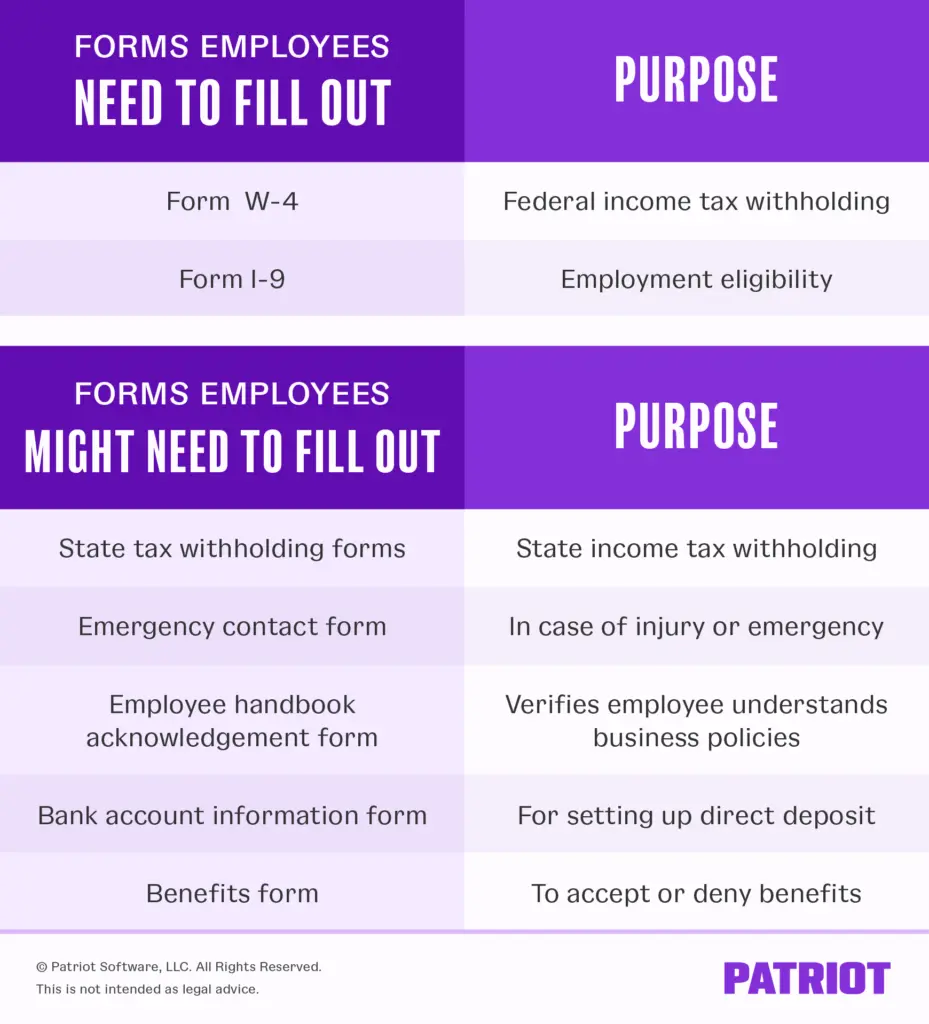
New employee forms by category
Again, we can break up new employee paperwork into the following categories:
- Employment eligibility form
- New hire tax forms
- Business-specific forms
To learn more about the documents you may need to give employees as part of their new hire packet, read on.
1. Employment eligibility forms
Before you can add an employee to your team, you are legally responsible for confirming the employee is eligible to work in the United States.
Form I-9
Among the forms for new employees to fill out is Form I-9. Form I-9, Employment Eligibility Verification, is used to verify that your employees are legally allowed to work in the United States. Use the most current edition of Form I-9 to stay compliant.
Form I-9 is divided into three sections. The employee fills out the first section, and you fill out the second section. The third section is only for reverification of employment eligibility or rehires.
The form asks questions like the employee’s name, address, Social Security number, and citizenship status. There is also a section in case the employee uses a preparer or translator to help them fill out the form.
Keep in mind that if the new employee does not have a Social Security number, they should fill out Form SS-5, Application for Social Security Card. You must have a Social Security number for each employee on file so you can put it on Form W-2.
The employee must bring in original I-9 documents to prove their identity and employment eligibility. You need these documents to complete the employer section of Form I-9. There are three lists of acceptable documents in Form I-9: Lists A, B, and C.
Employees bring in one document from List A that confirms their identity and employment authorization (e.g., U.S. passport). Or, they can provide one document from List B that confirms their identity (e.g., driver’s license) and one document from List C that verifies their employment authorization (e.g., U.S. Citizen ID Card).
In the employer section, provide information about the document(s) the employee brings in. Then, certify that the documents are genuine to the best of your knowledge. Include information like your name, business name, and company address, and sign Form I-9.
Note for remote hiring: Qualified employers enrolled in E-Verify may be eligible to use DHS’s alternative remote document examination procedure for Form I-9. Review USCIS guidance to confirm eligibility and recordkeeping steps before using this option.
2. New hire tax forms
Before you can add a new hire to your payroll, you need to know how much money to withhold from their wages for federal and, if applicable, state income taxes.
To find out, you need to collect two new hire tax forms: federal and state W-4 forms.
Form W-4
Form W-4, Employee’s Withholding Certificate, is required by the IRS. Employers use Form W-4 to determine the amount of federal income tax to withhold from an employee’s wages.
Employees can add information to Form W-4 to increase or decrease their federal income tax withholding.
The new W-4 form asks for the employee’s information (e.g., name, Social Security number, address, marital status) and tax withholding adjustments. Employees can change their information on Form W-4 at any time throughout the year.
If an employee does not submit a W-4, you must default to withholding as single with no adjustments under current IRS guidance. Use the percentage method or wage bracket method in IRS tables to calculate withholding.
In rare cases, you might even have an employee who claims exemption from federal income taxes. If an employee claims exemption, do not withhold federal income tax from their wages.
After you receive Form W-4, use the tax tables in IRS Publication 15 to determine the amount of taxes to withhold.
State W-4
What forms do employees need to fill out aside from the required Forms W-4 and I-9? If there is state income tax in the state your business is located, collect state tax withholding forms from employees.
Not all states have state income tax. Alaska, Florida, Nevada, New Hampshire, South Dakota, Tennessee, Texas, Washington, and Wyoming do not have state income tax. Unless your business is in one of these states, your employee must fill out a state tax withholding form.
Like the federal W-4 form, state tax withholding forms ask employees for their personal information. Many states use withholding allowances to determine state income tax withholding.
For example, if your business is in California, your employee must fill out a DE-4 Withholding Certificate. Check out our New Employer Information by State resource for your state’s withholding form and direct links to state websites.
Keep in mind that you might also need to withhold local income tax from employee wages. Typically, local income taxes are a percentage of employee wages and are not determined by a withholding form.
3. Business forms for new employees to fill out
In addition to employment eligibility and tax forms, you may require new hires to submit additional forms for your business.
Emergency contact form
Asking employees to provide emergency contact information is very important. In case of emergency, you need to know who to contact on behalf of the employee.
An emergency contact form can be as simple as the employee providing their information and the information of two or three contacts. Ask employees for each contact’s name, relationship to the employee, address, and home and work phone numbers.
It’s a good idea for employees to choose emergency contacts who are somewhat near their work location. Employees should update the information on their form when necessary.
Employee handbook acknowledgment form
If you haven’t thought about having an employee handbook at your business, now’s the time to create one. You can even simplify this task by using an employee handbook builder, a tool that guides you through the process.
Having an employee handbook details information like employment laws, employee conduct, payroll, and other important business policies. Workers can consult the employee handbook when they have questions.
Provide an employee handbook acknowledgment form for the employee to fill out, verifying that they read through the handbook and understand your business’s policies.
Bank account information form
Collect the employee’s bank account information if they elect to receive their wages via direct deposit or if you are in a state that allows mandatory direct deposit.
The bank account information form should ask for the following information:
- Employee name
- Type of account (checking or savings)
- Name and routing number of the bank
- Employee’s bank account number
The employee also needs to sign and verify that they want to receive their wages via direct deposit.
Once direct deposit is set up for your business and you have employee bank account information, you can start running payroll.
Benefits forms
You might choose to offer small business employee benefits. If you do, collect forms indicating their involvement in the programs. Employees need to give you forms even if they do not want to participate in the benefits program(s).
Here are some benefits you might offer at your small business:
- Health insurance
- Life insurance
- Disability insurance
- Retirement plans
Provide information about the benefits you offer. In the benefits package, your employees must accept or deny participation in the program(s). Collect these forms from employees before enrolling them.
First-time employer? Quick setup steps
If you’re hiring your first employee, these steps help you launch payroll smoothly:
- Get an EIN from the IRS.
- Register for state payroll accounts (withholding, unemployment) and confirm any local tax accounts.
- Choose a pay schedule that complies with your state (e.g., biweekly, semimonthly).
- Report the new hire to your state’s New Hire Reporting Center (often within 20 days; some states require sooner).
- Create written compensation terms (rate/salary, overtime eligibility, pay frequency) and set PTO/overtime policies.
- Decide how you’ll run payroll (e.g., payroll software) and how you’ll pay employees (direct deposit or check).
- Set up secure recordkeeping for I-9s, W-4s, state forms, and payroll records.
When should new employees fill forms out?
Employees must fill out new employee forms before they begin work at your business. You can either have the employee:
- Fill out forms at your business on their first day
- Fill out forms on their own before their first day
Make sure the employee knows ahead of time what documents they need to bring in order to complete Form I-9, and that Section 1 must be completed no later than their first day while you complete Section 2 within three business days.
Keep W-4s on file for at least four years after the date the last tax was due or paid, and retain I-9s for the longer of three years after the hire date or one year after termination. Do not submit these forms routinely to the IRS or DHS unless requested.
Once the new employee completes the forms, keep them in your records. Your employee can then begin work at your business.
Onboarding new employees: 5 Tips
The employee filled out the paperwork. Now what? Now, it’s time to onboard your new hire to get them up and running quickly.
Here are five key elements of a successful employee onboarding program:
- Clearly define the job and your expectations: Every position should have a distinct set of responsibilities, with clear goals and expectations for each employee.
- Develop an orientation program: Consider assigning a mentor, presenting an overview class, training the employee on policies and procedures, and giving a tour of your company building.
- Prepare the work environment: All the tools new employees need should be ready the minute they come to the office on their first day of work.
- Introduce new employees to team members: Schedule a team meeting on the employee’s first day or make another employee responsible for introductions to other team members.
- Stay connected: During the first few months of employment, make a point to check in with new hires.
Payroll software options for new employers
Patriot Software can help you simplify payroll from day one:
- Guided onboarding checklists for new hires (W-4, I-9, direct deposit)
- Automatic tax calculations and filings with Full Service Payroll
- Direct deposit, employee self-service, plus secure document storage (with HR add-on)
- Transparent pricing
- Easy to switch and USA-based support
Streamline forms, stay compliant, and run payroll in minutes. Try Patriot Payroll free.
FAQs: New employee forms
Form I-9 verifies identity and work authorization. The employee completes Section 1 by their first day; the employer reviews acceptable documents and completes Section 2 within three business days.
No, do not send W-4s and I-9s to the government. Keep them in your records. Provide them only if requested or during an audit. (You may need to enroll in and use E-Verify if required by law or contract.)
Withhold federal income tax as single with no adjustments per IRS guidance until a new W-4 is provided.
States without state income tax do not require a state W-4 form: Alaska, Florida, Nevada, New Hampshire, South Dakota, Tennessee, Texas, Washington, and Wyoming.
I-9: retain for three years after hire or one year after termination, whichever is later. W-4 and payroll records: generally four years after the date the tax is due or paid.
Benefits and direct deposit forms should be completed during onboarding and before the first payroll if you plan to pay via direct deposit or start benefits on the hire date.
Keep all employee forms in one place. Patriot’s small business human resources software is a great add-on to our online payroll software. With the HR Software, you can keep employee files online and give employees access to their documents. Try both for free today!
This article has been updated from its original publication date of May 12, 2017.
This is not intended as legal advice; for more information, please click here.