
One word, two syllables. And completely unavoidable if you’re an employer. Ah yes, we’re talking about payroll. It’s a pretty common term in the workplace (Don’t forget to run payroll!). But, what is payroll exactly?
Payroll definition spoiler alert: Payroll = paying employees. Without payroll, employees don’t get paid. So if your business has employees, you must, must, must run payroll.
Payroll at a glance
- What it is: The process of calculating pay, withholding and remitting taxes, issuing payments, and keeping required records every pay period.
- What it includes: Hours/salaries, overtime, pre- and post-tax deductions, employer taxes (e.g., FUTA/SUTA), wage delivery, and filings.
- Why it matters: It’s legally required, a major expense, and directly affects employee morale and cash flow.
- Typical employer on-costs: Often 15%–20% above wages for taxes and contributions (varies by state, benefits, and headcount).
- Common methods: Manual, payroll software, or outsourcing. Software can reduce processing time to minutes and improve accuracy.
What is payroll?
Payroll is the process of paying employees. Employers must handle payroll each pay period so
employees receive their wages. But, payroll is more than just a paycheck. There are many moving parts, like gathering employee hours worked, calculating taxes and other deductions, distributing wages, and reporting and remitting taxes and other deductions to the right parties (e.g., IRS). It also includes staying compliant with federal, state, and local regulations and correctly administering benefits and withholdings.
When it comes to payroll meaning, you may hear phrases like:
- Running payroll: This is the process of actually calculating and distributing wages and taxes.
- Employees on payroll: This is the list of the employees you pay, along with their information. Keep in mind that it does not include independent contractors.
- Payroll expense: This is the amount your business spends on employee wages and taxes. You must record the expense in your accounting books.
It’s time to dive deeper into the parts of payroll.
Key payroll terms
Ready for a lightning-speed round of important payroll terms? Here are some common terms and their definitions:
| Payroll Term | Definition |
|---|---|
| Pay frequency | A recurring length of time that determines how often you pay employees. Common pay frequencies include weekly, biweekly, semimonthly, and monthly. |
| Payroll cutoff | The date and time you must run payroll so it can be processed by your payroll provider or bank in time for payday. |
| Gross wages | The total amount you pay an employee before withholding taxes and deductions. |
| Overtime pay | Overtime pay is time and a half for every hour an employee works beyond 40 in a week. All nonexempt employees receive overtime pay. |
| Payroll taxes | The amount you withhold from an employee’s wages and contribute as the employer. Taxes may include federal, state, and local income; Social Security; and Medicare taxes. |
| Pre-tax deductions | The amount you withhold from an employee’s wages before calculating and withholding some or all taxes. Examples include health insurance and some retirement plans. |
| Post-tax deductions | The amount you withhold from an employee’s wages after calculating and withholding taxes. Examples include garnishments and some retirement plans. |
| Net pay | An employee’s take-home pay / net wages is the total amount after subtracting taxes and other deductions from the employee’s gross wages. |
| Pay stub | A document that details the employee’s gross wages, taxes, and deductions; employer contributions and taxes; and the employee’s net pay. |
| Payroll forms | Forms employers must file with tax agencies (e.g., the IRS) that summarize employee pay information, such as wages and taxes. Examples include Form 941 and Form W-2. |
| Payroll software | A system that automates the payroll process by calculating wages and taxes. Some systems include an automated payroll feature that completely automates the process. |
Note on employer taxes: Employers also pay taxes like federal unemployment, or FUTA, tax (generally 6%
on the first $7,000 of each employee’s wages, though often reduced by credits) and state unemployment tax (SUTA), which varies by state and business.
What is the payroll process? An in-depth look
Again, payroll has a lot of moving parts. In this section, we’ll break what is payroll down to a science. Most small businesses run payroll weekly, biweekly, or semimonthly. Using payroll software can cut processing time to minutes and improve accuracy.
But before you can begin to run payroll, you need to make some decisions. Among other responsibilities, you must:
- Determine your pay frequency (e.g., biweekly)
- Decide how to pay employees (e.g., direct deposit)
- Register for an Employer Identification Number (EIN) and state accounts (e.g., state unemployment insurance)
- Register for state income tax withholding accounts (where applicable)
- Create an Electronic Federal Tax Payment System (EFTPS) account
And each time you hire an employee, you need to decide whether they are exempt or nonexempt from overtime wages. You must also collect Form W-4 (among other new employee forms) to properly run and distribute payroll.
Without further ado, take a look at what is payroll composed of on a micro-level.
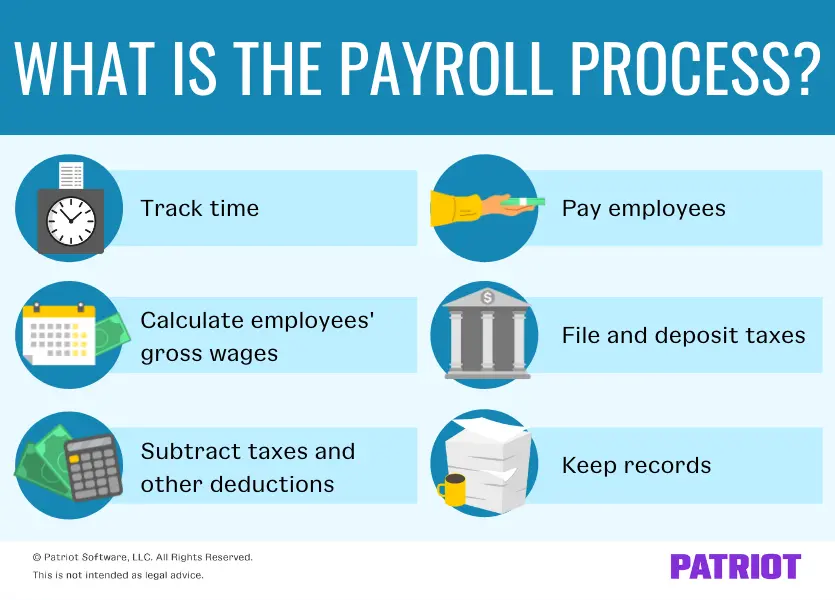
1. Track time
To run payroll, you need to track your employees’ time. This includes:
- Regular hours worked
- Time off (e.g., paid time off)
- Overtime hours (i.e., time and a half)
Tracking employee hours ensures you pay your employees the proper amount. Collect timesheets from employees that detail how many hours they worked during the pay period and whether they took time off. Consider a time and attendance system to reduce errors and automatically import hours into payroll.
2. Calculate employees’ gross wages
You may have salaried employees, hourly employees, or both. Once you know how many hours they worked, you can calculate their gross wages.
To calculate your salaried employees’ gross wages, divide the number of pay periods in the year by their annual salary. For example, you give an employee a yearly salary of $50,000 and pay them weekly. Because there are 52 weeks in the year, the employee’s weekly gross wages are $961.54 ($50,000 annual salary / 52 weeks). Remember to account for any overtime if the employee is nonexempt and works over 40 hours in the workweek.
To calculate your hourly employees’ gross wages, multiply their rate of pay by the number of hours worked in the pay period. Let’s say you pay an employee $18 per hour. Because the employee worked 40 hours this week, you would pay them $720 ($18 per hour X 40 hours).
Keep in mind that employees could have additional sources of pay you must include in payrolls, such as tips, commissions, or bonuses.
3. Subtract taxes and other deductions
One of the most important (and confusing) parts of payroll is subtracting taxes and other deductions from employees’ gross wages.
Pre-tax deductions: First, determine if an employee has pre-tax deductions. If they do, subtract them from the employee’s gross pay before calculating applicable taxes. Pre-tax benefits can reduce taxable wages for some taxes (e.g., federal income tax), but not always for FICA, so be sure to check plan rules.
Taxes: Next, it’s time to calculate the employee’s tax withholding. You must deduct the following taxes from an employee’s pay:
- Federal income tax
- Social Security tax
- Medicare tax
- State and local income taxes (if applicable)
- State-specific taxes
Keep in mind that you must also pay employer taxes on your employees’ pay. Employer taxes include Social Security, Medicare, federal unemployment, and state unemployment taxes. FUTA is generally 6% on
the first $7,000 of wages per employee (the effective rate is often 0.6% after credits). SUTA rates vary by state and your experience rating.
Post-tax deductions: If the employee has any post-tax deductions, withhold them after calculating employee taxes. Examples include wage garnishments, Roth retirement contributions, or certain insurance premiums.
4. Pay employees
After subtracting taxes and other deductions from the employee’s gross wages, voila. You arrive at the employee’s net, or take-home, pay.
Before you pay employees, verify that your information and calculations are correct. Once you’ve approved payroll, it’s time to pay employees.
You might pay employees via:
- Direct deposit
- Paychecks
- Mobile wallet
- Pay cards
- Cash
When you pay employees, you might also provide paper or digital pay stubs. That way, employees can see their payroll information. Pay stubs typically show current and year-to-date (YTD) wages, taxes, deductions, and net pay.
5. File and deposit taxes
Think paying employees is the end of the payroll process? Not so fast. You also need to file and deposit taxes with the IRS and, if applicable, your state and local governments.
Deposit federal income, Social Security, and Medicare taxes with the IRS. You must deposit them monthly or semiweekly, depending on your deposit schedule. To report the taxes, file Form 941, Employer’s Quarterly Federal Tax Return, or Form 944, Employer’s Annual Federal Tax Return. Use the Electronic Federal Tax Payment System (EFTPS) to make deposits electronically.
Deposit state and local taxes depending on the tax agencies’ rules. The forms you must file to report the taxes vary, too.
Last but not least, remember to deposit and file employer-only taxes, like federal unemployment tax and state unemployment tax. FUTA is reported annually on Form 940. At year-end, provide employees Form W-2 by January 31 and file copies with the SSA and applicable agencies.]=
6. Keep records
The Fair Labor Standards Act (FLSA) and IRS require you to keep detailed records for, well, a while. So, how long do you need to keep payroll and tax records? Check out the chart to find out:
| Type of Record | How Long to Keep |
|---|---|
| Timecards and other records on which wage computations are based | At least 2 years |
| Payroll records | At least 3 years |
| Employment taxes | At least 4 years |
Not only are detailed records required by the FLSA and IRS, but you also need them to complete Form W-2, Wage and Tax Statement, each year. And, you can gather payroll analytics from your records to improve decision-making, increase efficiency, and more.
How much does payroll cost?
- Employer on-costs: In addition to wages or salaries, plan for roughly 15%–20% in employer taxes and contributions (FICA match, FUTA, SUTA, workers’ comp, and benefits). Actual costs vary by state and your benefits mix.
- Manual payroll: Lowest direct cost, but highest time cost and error risk; compliance tracking is on you.
- Payroll software: Subscription fees vary, but automation can reduce errors, help with compliance, and save time each pay run. Check out our best payroll software for small businesses list to compare popular providers.
- Outsourced payroll: Highest ongoing cost; best for complex needs or when you want an expert to handle filings and payments end-to-end.
How to run payroll
And now, it’s time to go from learning What does payroll mean? to learning how to handle payroll. You have three payroll solutions when it comes to running payroll.
You can:
- Do payroll by hand
- Outsource payroll
- Use payroll software
1. Do payroll by hand
This option is the most time-consuming (but least expensive) payroll option. It requires you to learn the ins and outs of payroll and keep up-to-date with payroll trends on your own.
You must calculate taxes and other deductions manually. The IRS provides income tax withholding tables you can use to calculate federal income tax withholding. Consult your state for information on state income tax withholding.
Also, keep organized and detailed records someplace secure and safe. For example, you might use a spreadsheet to show gross pay, taxes and deductions, and net pay.
Last but not least, you’re responsible for filing and depositing taxes with the IRS and any state and local agencies, if applicable. Set calendar reminders to avoid late fees and other penalties.
Best for: Very small teams with simple pay structures.
Watch out for: Time burden, manual compliance tracking, and higher error risk.
2. Outsource payroll
Outsourcing payroll is the most expensive (but least time-consuming) payroll option. Although you free up precious time from doing payroll by hand, you should consider whether doing so is in your budget.
You might outsource payroll to a payroll accountant or professional employer organization (PEO). The person or company you outsource payroll to typically handles the entire process for you, from calculations to wage distribution.
Best for: Fast-growing or complex employers (multi-state, many benefits, garnishments).
Watch out for: Contracts, per-employee fees, and less day-to-day control.
3. Use payroll software
Looking for an option in the middle between doing payroll by hand and outsourcing payroll? If so, payroll software might be just right for you.
Payroll software can be inexpensive and easy to use. It can improve your payroll KPIs by decreasing your payroll processing time and increasing your payroll accuracy rate. So, what is payroll software? Again, payroll software calculates wages and taxes so you don’t have to. So no, you don’t have to worry about using the IRS tax withholding tables.
And if you opt for full-service payroll software, you don’t need to file or deposit taxes either (the system does it on your behalf!). When choosing a payroll system, consider cost, features, and other factors to help you decide on a provider.
Best for: Small businesses that want control and speed with built-in compliance help.
Watch out for: Feature fit (e.g., multi-state, multiple pay rates) and add-on costs you may or may not need.
Payroll solutions for small businesses
If you’re considering software, here’s how Patriot can help:
- Full-service tax filing and deposits: Federal, state, and local taxes handled on your behalf with Full Service Payroll.
- Automated payroll: Option to run payroll on a schedule with your rules and approvals.
- Flexible pay options: Direct deposit, printable checks, and employee self-service portals with digital pay stubs.
- Compliance support: Built-in calculations for federal and state taxes, with updates as rules change.
- Integrations and add-ons: Time and attendance, accounting, and HR features to streamline your workflow.
- Transparent pricing: See plans and details here.
- Best for: Businesses that want an easy, accurate way to run payroll in minutes while staying compliant.

Enjoy a simple 3-step process, free USA-based support, and so much more.

FAQs
Payroll is how a business pays employees: calculating earnings, withholding and remitting taxes, issuing payments, and keeping required records each pay period.
No, contractors are not W-2 employees. They receive a 1099-NEC and do not typically have taxes withheld.
However, some payroll software features include the ability to pay contractors in payroll to streamline admin work.
Common pay frequencies are weekly, biweekly, semimonthly, or monthly. State laws may limit or require minimum pay frequencies.
Employers generally pay the employer share of Social Security and Medicare (FICA), FUTA (federal
unemployment tax), and SUTA (state unemployment tax). Rates and wage bases vary by program and state.
Generally, file Form 941 quarterly (or Form 944 annually if eligible), deposit taxes via EFTPS on your assigned schedule, file Form 940 annually for FUTA, and furnish/file Forms W-2 by January 31.
Keep timecards for at least 2 years, payroll records for at least 3 years, and employment tax records for at least 4 years. Some states may require longer retention.
Beyond wages, plan for roughly 1.25 – 1.4 times the employee’s salary for employer taxes, workers’ comp insurance, benefits, and miscellaneous expenses.
It’s your deadline to submit payroll so your provider or bank can process payments in time for payday.
Gross pay is total earnings before deductions; net pay is take-home pay after taxes and other deductions.
This article has been updated from its original publication date of January 10, 2011.
This is not intended as legal advice; for more information, please click here.