Each year, you need to file Form W-2 for your employees. You might need to use Form W-2 Box 12 codes to accurately fill out Form W-2.
If you are not familiar with Box 12, there are currently 33 codes to report certain compensation and benefit amounts. The codes range from life insurance coverage to the amount you contributed to an employee’s adoption expenses. And thanks to the One Big Beautiful Bill Act (OBBBA), there are three new codes debuting on the 2026 Form W-2: TP (tips), TT (qualified overtime compensation), and TA (Trump account contributions).
Form W-2 Box 12 codes: instructions
The code and the corresponding amount must go in Box 12. Since there are four parts of Box 12 on Form W-2 (12a, 12b, 12c, and 12d), you can put up to four codes and amounts on the W-2. If you need to report more than four, you will need an additional Form W-2. Box 12 is highlighted in the Form W-2 below, courtesy of the IRS.
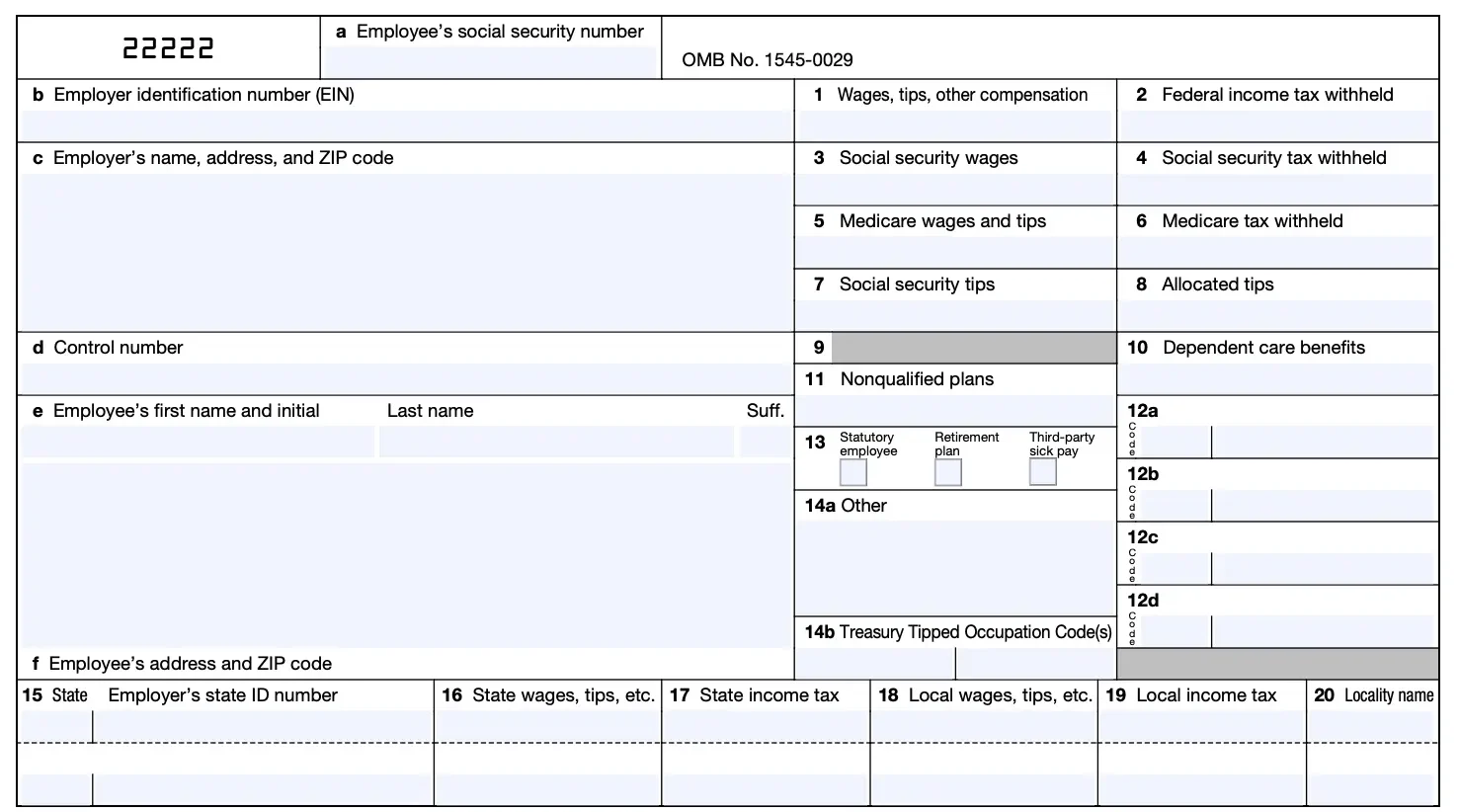
There is a vertical line dividing each section of Box 12. The code goes on the left of the vertical line, and the dollar amount goes on the right of the line. For example, if your employee deferred a total of $1200.00 to their 401(k) plan, you would enter D | 1200.00 in Box 12.
What’s new on Box 12 for 2026?
Heads up: The One Big Beautiful Bill Act created new federal income tax deductions for tips and federal income tax deductions for overtime premium pay, along with new “Trump accounts” for children. As a result, the IRS added three new Box 12 codes to the 2026 Form W-2 (the one you’ll file in early 2027):
Code TP: Total amount of cash tips reported to the employer. Use code TP to report the total cash tips your employee reported to you during the year. Cash tips include voluntary cash or charged tips from customers, as well as tips employees receive through tip-sharing arrangements.
Mandatory service charges added to a customer’s bill are not qualified tips. Employees in qualifying tipped occupations can deduct up to $25,000 in qualified tips on their federal income tax return (2025–2028). Keep in mind that tips are still subject to federal income tax withholding, Social Security tax, and Medicare tax.
If you report cash tips with code TP, you must also enter the employee’s three-digit Treasury Tipped Occupation Code (TTOC) in new Box 14b. The IRS’s final regulations list more than 70 qualifying tipped occupations, organized into eight categories (codes in the 100s–800s), from bartenders to water taxi operators. You can enter up to two occupation codes per employee. On the 2026 form, Box 14 splits into Box 14a (Other, e.g., state disability insurance taxes, union dues) and Box 14b (TTOC).
Code TT: Total amount of qualified overtime compensation. Use code TT to report qualified overtime compensation — the premium portion of overtime pay that exceeds the employee’s regular rate under Section 7 of the Fair Labor Standards Act (FLSA).
In other words, only report the “.5” in time-and-a-half, not the employee’s total overtime wages. Employees can deduct up to $12,500 ($25,000 for married filing jointly) in qualified overtime compensation on their federal return (2025–2028). Like tips, qualified overtime is still subject to federal income tax withholding, Social Security tax, and Medicare tax.
Code TA: Employer contributions to a Trump account. Trump accounts are a new type of individual retirement account for children under 18. Beginning July 4, 2026, employers can contribute up to $2,500 per year (indexed for inflation after 2027) to the Trump account of an employee or an employee’s dependent under a Section 128 Trump account contribution program.
Contributions you make under a qualifying program are excluded from the employee’s gross income. Report your contributions in Box 12 using code TA. Keep in mind that Trump accounts have an overall annual contribution limit of $5,000 (including employer contributions).
Reminder: These codes first appear on the 2026 Form W-2. Do not use them on 2025 forms — for tax year 2025, the IRS provided transition relief, and the W-2 itself was unchanged.
- Easy onboarding with our setup wizard
- Free direct deposit
- Free USA-based support

Form W-2 Box 12 code chart with explanations
Take a look at the chart below to see Form W-2 Box 12 codes and explanations. This information is also found on the IRS General Instructions for Forms W-2 and W-3.
| Code | Explanation |
|---|---|
| A | Uncollected Social Security or RRTA tax on tips. If you did not withhold Social Security tax or Railroad Retirement Tax Act tax (retirement taxes for the railroad industry) on an employee’s tips, you will enter A and the amount in Box 12. |
| B | Uncollected Medicare tax or RRTA tax on tips. If you did not withhold Medicare tax or Railroad Retirement Tax Act on an employee’s tips, you will enter B and the amount in Box 12. |
| C | Taxable cost of group-term life insurance over $50,000. If you provide group-term life insurance coverage over $50,000, you will enter C in Box 12, as well as Boxes 1, 3, and 5. For the amount you need to enter, consult the IRS. |
| D | Elective deferrals under a section 401(k) cash or deferred arrangement plan (including a SIMPLE 401(k) arrangement). If your employee contributes to a 401(k) retirement plan, enter D and the amount in Box 12. Also, check the retirement plan box in Box 13. |
| E | Elective deferrals under a section 403(b) salary reduction agreement. If your employee contributes to a 403(b) retirement plan, enter E and the amount in Box 12. Check the retirement plan box in Box 13 as well. |
| F | Elective deferrals under a section 408(k)(6) salary reduction agreement. If your employee contributes to a 408(k)(6) retirement plan, including a Simplified Employee Pension plan (SEP), enter F and the amount in Box 12. |
| G | Elective deferrals and employer contributions (including nonelective deferrals) to a section 457(b) deferred compensation plan. This is a retirement plan for government businesses including hospitals and charities, but if your employee contributes to a 457(b), enter G and the amount in Box 12. |
| H | Elective deferrals to a section 501(c)(18)(D) tax-exempt organization plan. This retirement plan is a tax-exempt organization plan. If your employee contributes to a 501(c)(18)(D) plan, enter H and the amount in Box 12 as well as Box 1. |
| I | Currently not used. |
| J | Nontaxable sick pay. Show any sick pay that was paid by a third party and is not includible in income (and not shown in Boxes 1, 3, and 5) because the employee contributed to the sick pay plan. |
| K | 20% excise tax on excess golden parachute payments. Excess golden parachute payments apply to employees of big corporations who are undergoing mergers. |
| L | Substantiated employee business expense reimbursements. If an employee’s business expenses are nontaxable, you would include this in Box 12. To determine if your employee’s business expenses are nontaxable, consult the IRS. Taxable portions go in Boxes 1, 3, and 5. |
| M | Uncollected Social Security or RRTA tax on taxable cost of group-term life insurance over $50,000 (former employees only). If you did not collect Social Security tax or RRTA tax from former employees for group-term life insurance over $50,000, enter M and the amount in Box 12. |
| N | Uncollected Medicare tax on taxable cost of group-term life insurance over $50,000 (but not Additional Medicare Tax; for former employees only). If you did not collect Medicare tax or RRTA tax from former employees for group-term life insurance over $50,000, enter N and the amount in Box 12. |
| P | Excludable moving expense reimbursements paid directly to members of the Armed Forces. This is only for members of the Armed Forces. |
| Q | Nontaxable combat pay. This is only for military personnel. |
| R | Employer contributions to an Archer Medical savings account. If your employees have Archer Medical savings accounts, you will enter the amount you contributed in Box 12. You will also need to report amounts not excluded in your employee’s gross pay in Boxes 1, 3, and 5. |
| S | Employee salary reduction contributions under a section 408(p) SIMPLE plan. If an employee contributes to a SIMPLE retirement plan (and not a 401(k)), include the amount they have taken out of their paychecks in Box 12. Also, enter the amount in Boxes 3 and 5, as well as check the retirement plan box in Box 13. |
| T | Adoption benefits. If you offer benefits to your employees who adopt, you will need to include the total amount in Box 12. Also, if your employee contributes to a 125 adoption plan, include what they contributed before taxes. Enter the total amount in Boxes 3 and 5 as well. |
| U | Currently not used. |
| V | Income from exercise of nonstatutory stock option(s). You will report the difference between the fair market value and the price an employee paid for a nonstatutory stock in Box 12, as well as in Boxes 1, 3, and 5. |
| W | Employer contributions to a Health Savings Account (HSA) (including employee contributions through a cafeteria plan). If you contribute to an employee’s Health Savings Account plan, you will enter the amount of your contributions in Box 12. Also, you need to include your contributions in Box 1. |
| Y | Deferrals under a Section 409A nonqualified deferred compensation plan. Regardless of whether the deferrals are part of income or not, enter the amount put into a nonqualified deferred compensation plan. |
| Z | Income under a nonqualified deferred compensation plan that fails to satisfy Section 409A. You will enter the amount of total income that does not meet the requirements of Section 409A. The amount for Code Z will be taxed at 20% plus interest on your employee’s Form 1040. |
| AA | Designated Roth contributions under a section 401(k) plan. If your employee contributes to a Roth 401(k) plan, report the amount in Box 12, and check the retirement plan box in Box 13. |
| BB | Designated Roth contributions under a section 403(b) plan. Enter the amount an employee contributed to a Roth 403(b) plan in Box 12, and check the retirement plan box in Box 13. |
| CC | Currently not used. |
| DD | Cost of employer-sponsored health coverage. You will report the amount of employer-provided health coverage in Box 12 with Code DD. |
| EE | Designated Roth contributions under a governmental section 457(b) plan. You will include Roth contributions under a 457(b) plan in Box 12 as well as Boxes 1, 3, and 5. |
FF | Permitted benefits under a qualified small employer health reimbursement arrangement (QSEHRA). If you offer a QSEHRA, report the total amount of permitted benefits the employee is entitled to receive for the year with code FF. |
| GG | Income from qualified equity grants under Section 83(i). Report the amount includible in income for the year from qualified equity grants under a Section 83(i) election. |
| HH | Aggregate deferrals under Section 83(i) elections as of the close of the calendar year. Report the total deferrals under Section 83(i) elections as of the end of the year. |
| II | Medicaid waiver payments excluded from gross income under Notice 2014-7. Report nontaxable Medicaid waiver payments (difficulty of care payments) with code II. |
| TA | Employer contributions to a Trump account. Report contributions you make under a Section 128 Trump account contribution program to the Trump account of an employee or an employee’s dependent (up to $2,500 per year, beginning July 4, 2026). New for the 2026 Form W-2. |
| TP | Total amount of cash tips reported to the employer. Report all cash tips the employee reported to you for the year. Also enter the employee’s Treasury Tipped Occupation Code in Box 14b. New for the 2026 Form W-2. |
| TT | Total amount of qualified overtime compensation. Report only the FLSA overtime premium. That is the amount above the employee’s regular rate of pay (the “.5” in time-and-a-half). New for the 2026 Form W-2. |
Want to make filing Form W-2 easier on yourself? Patriot Software’s Full Service Payroll files Forms W-2 and W-3 to the SSA on your behalf. We guarantee reliability, and you won’t need to worry about missing deadlines. Spend more time on your small business and less time on the nitty-gritty with our online payroll solution. Try a free trial today!
This article has been updated from its original publication date of December 11, 2016.
This is not intended as legal advice; for more information, please click here.