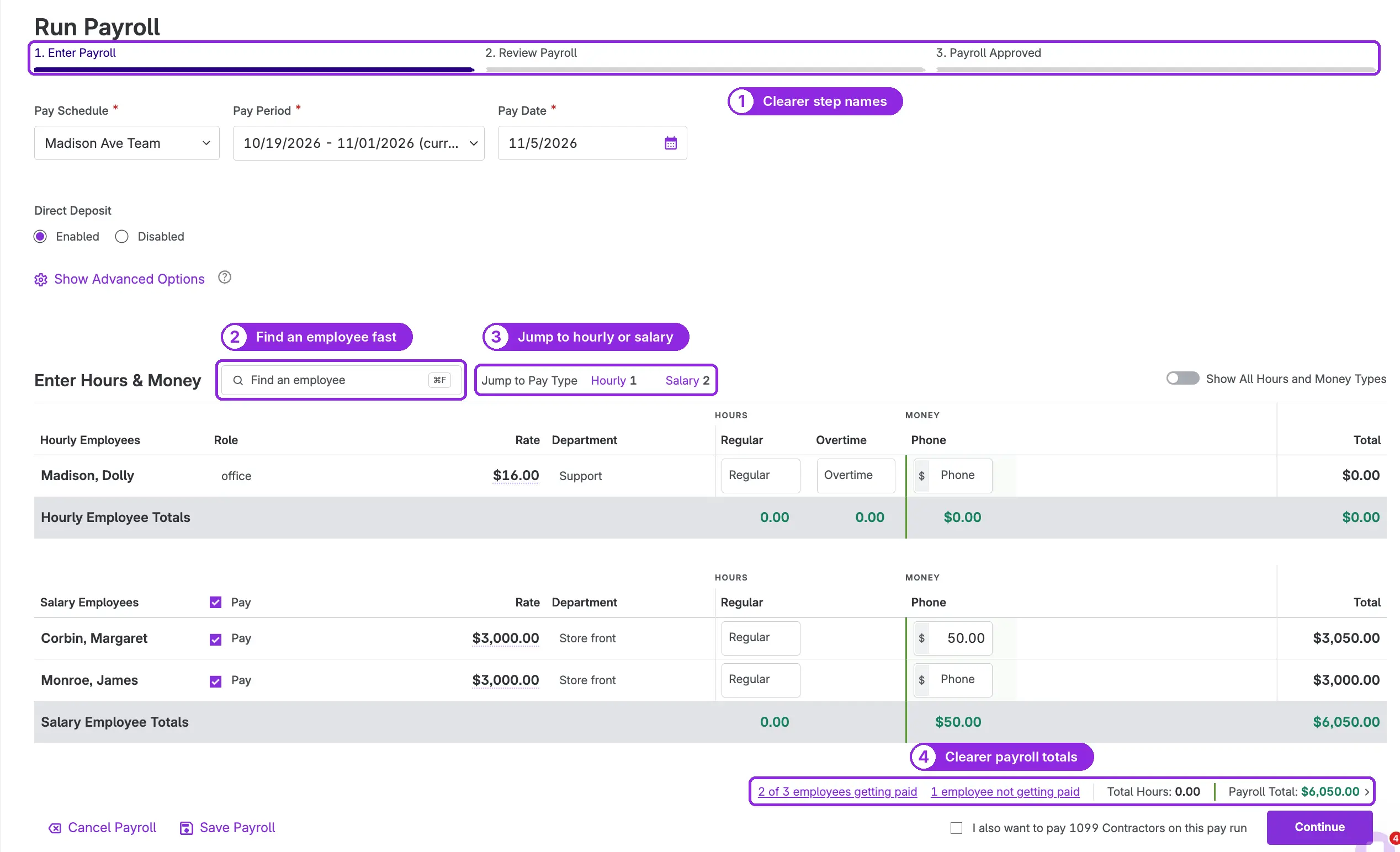
A faster, easier way to enter payroll
Payday is busy enough without hunting for someone’s row. We’ve updated the first step of running payroll so it loads faster, gets you to the right employee in seconds, and shows you who’s getting paid before you continue.
What’s new
- Faster loading. The page that lists your employees now loads much more quickly, and the difference is biggest for businesses with a lot of employees.
- Find an employee fast. Type a name in the new search bar to go straight to that person’s row.
- Jump to hourly or salary. Go right to your hourly or salaried employees. Each pay type shows how many employees it has, so you know what’s in the run at a glance.
- Clearer totals. The bottom of the page now shows how many employees are getting paid and how many aren’t, along with total hours and the payroll total. Click either employee count to see exactly who’s included, so nobody gets missed.
- Clearer step names. The three steps are now Enter Payroll, Review Payroll, and Payroll Approved, so you always know where you are.
- A final check before you approve. When you click Approve, Patriot makes sure nothing has changed since you reviewed the totals. If someone else on your team updated an employee’s pay or deductions while you were running payroll, the payroll recalculates with the new amounts, so the paychecks always match the latest information.
We’re rolling these updates out to customers in stages, so you may see them the next time you run payroll.