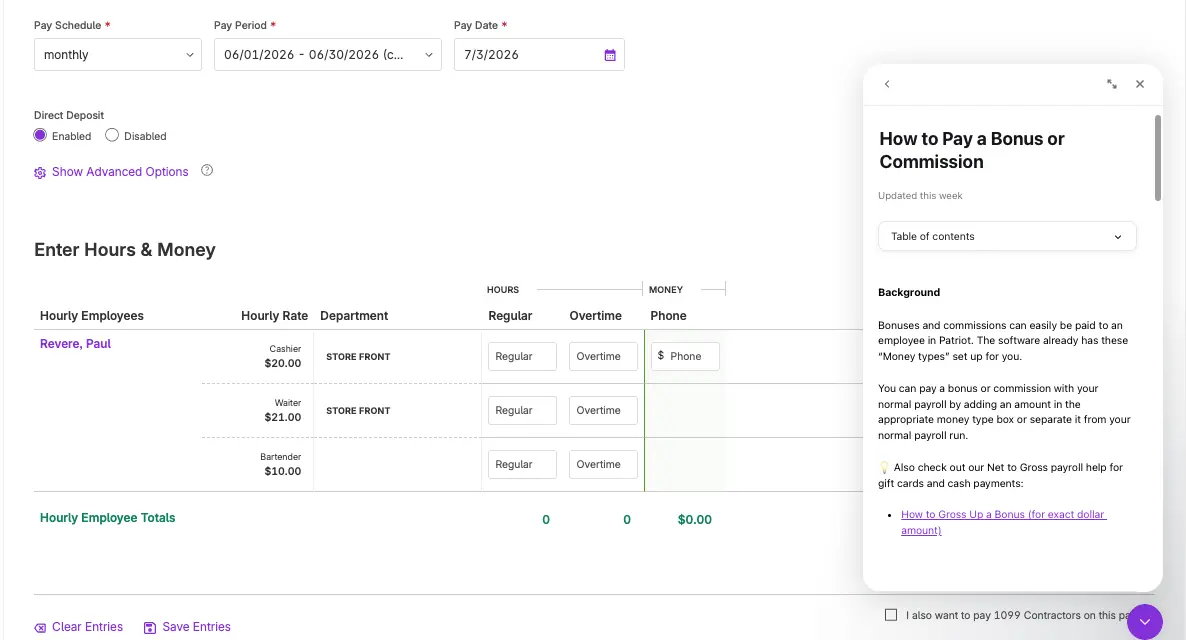
Finding answers in Patriot just got easier. Our new Help Center is designed to help customers, partners, and employees quickly find the answers they need.
What’s New
A Cleaner, Easier-to-Use Layout
The new Help Center has a refreshed design that makes it easier to browse help articles, training resources, and product guidance. From our new Help Home page, you can search for articles, chat support, see recent chats and answers, and easily find our email and phone number.
Improved Search
Customers can now search across Patriot help content more easily. Whether you know the exact topic you’re looking for or only have a general question, the improved search experience helps surface relevant articles faster.
On-Page Help
With the new Help Home Page, you can search for help articles directly inside your Patriot software. When you select an article, it opens on the right side of your screen, so you can follow the guidance without leaving the page you’re working on.
Help is now easier to find, easier to follow, and right where you need it.
Why It Matters
Small business owners do not have time to dig through a maze of support content. The new Help Center gives users a clearer path to answers, whether they’re learning Patriot for the first time or need a quick refresher on a specific task.
The goal is simple: make help easier to find, easier to understand, and easier to use.
Where to Find It
In your software, click the “Get Help” icon at the top of the page, or the purple icon at the bottom of your software page to open the new Help Home.
Learn more on our help article.