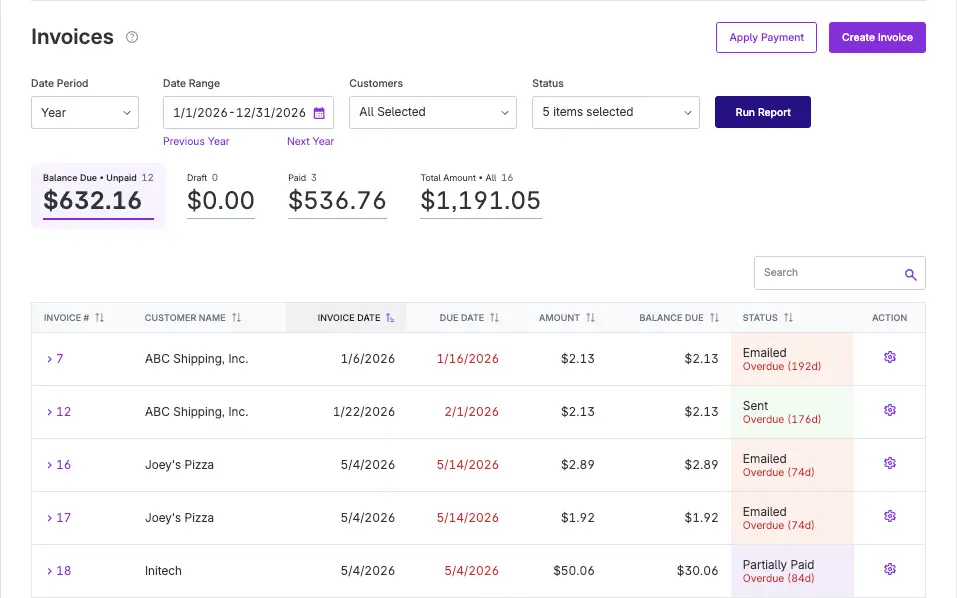
The invoice list summary metrics are back, and this time they come with an upgrade.
We replaced the old quick filters with metric cards that show you both dollar totals and invoice counts, broken out by status. At a glance, you can now see:
- Balance Due Unpaid – The cumulative balance due and invoice count across every unpaid status, including Saved, Sent, Emailed, Partially Paid, and Payment Initiated.
- Draft – The total amount and count of invoices still in draft.
- Paid – The total amount and count of invoices that have been paid in full.
- Total Amount – The total amount and count across all invoices, regardless of status.
The cards do double duty as filters too. Click any metric card and your invoice list updates instantly to show just those invoices, the same way the old quick filters worked. So whether you want a fast read on how much is outstanding or you need to drill into your paid invoices, it is one click away.
This update gives you a clearer financial snapshot right from the invoice list, without digging into reports or running extra searches. Check it out next time you are reviewing your accounting invoice list.