Payroll doesn’t always go according to plan. A last-minute bonus. A raise that starts this pay period. A correction you catch while reviewing Step 1.
Before, making a change meant stepping out of your payroll run, opening the employee’s record, updating their pay, heading back to payroll, and checking your totals all over again.
Now, you can make those changes right where you’re already working.
With Salary on-the-fly, you can edit salaried employees’ pay directly from Step 1 of Run Payroll without breaking your workflow.
Here’s how it works
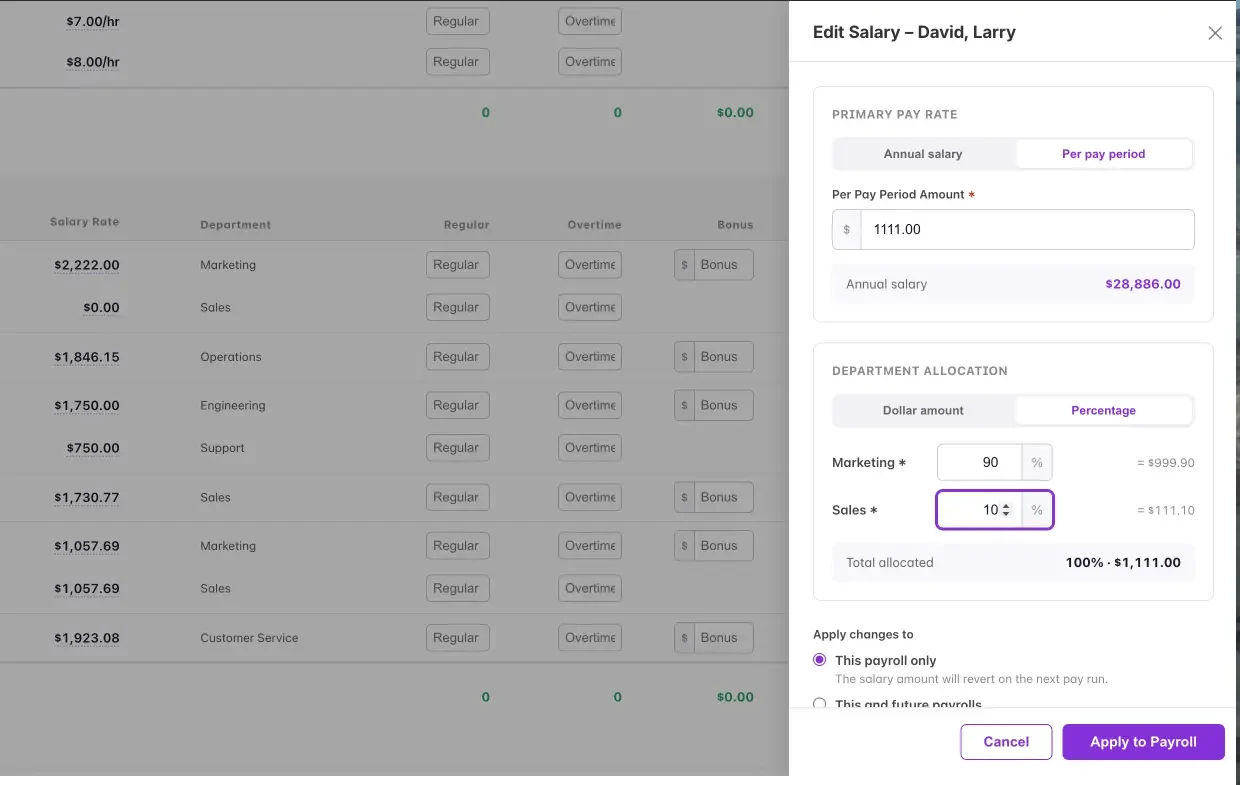
- Edit salary rates right in payroll. Hover over a salaried employee’s rate on Step 1 and click Edit to open the side drawer.
- Enter the amount your way. Add a new annual salary or per-pay-period amount, and Patriot converts it for you.
- Choose how long the change lasts. Select This payroll only to automatically revert on the next run, or This and future payrolls to update the employee’s record going forward.
- Adjust department allocations on the spot. For employees split across multiple departments, update allocations by percentage or dollar amount. A running total makes sure everything adds up before you apply the change.
- Preview before you commit. See the updated gross pay before applying the change, then watch the payroll grid update instantly.
Hourly employees, too—
We’ve brought hourly pay edits into the same side drawer, so hourly and salaried employees now have a consistent editing experience during payroll. You can update hourly rates, including multiple pay rates and roles, without leaving your payroll run.
Less back-and-forth. Fewer interruptions. More flexibility when payroll changes at the last minute.
Check out our help article, “How to Change a Salaried Employee’s Pay During Payroll.”