Partner Full Service Onboarding Report
In this article:
Background
Patriot Accountant Partners and staff with permissions can use the Full Service Onboarding Report to view each new full-service account’s onboarding step and status.
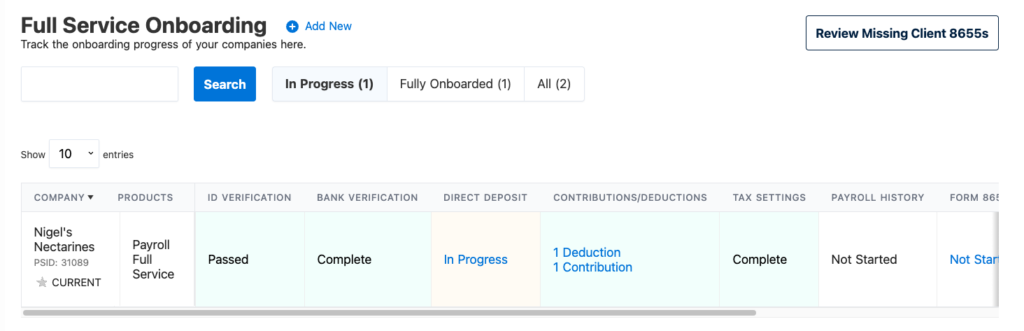
How to View Client Full Service Onboarding Status
- To access the report go to Reports > Partners > Client Company Reports >Full Service Onboarding
- Click on the client’s name to access their account.
- For imported companies: Click any link in the onboarding report to go to the settings page.
- For manually entered companies: Click any link to return to your last position in the setup wizard.
- Search to find clients by Patriot Software ID number, or company name in the search bar
- Filter using the tabs across the top of the report to filter by progress
- “In Progress” accounts
- “Fully Onboarded” accounts
- “All” displays all accounts regardless of status
- Sort the company column alphabetically
- Review Missing Client 8655s by click the button at the top of the report to easily view full-service accounts missing their IRS Form 8655.
Report Display Statuses
The Full Service Onboarding report lists several important steps that must be completed to have your client successfully onboarded before the full service tax filing is set up. Below are the columns with possible display statuses.
| COLUMN | DISPLAY STATUSES |
| Company | Company name and ID number |
| Products | All active products selected |
| ID Verification | Not Started Passed Failed |
| Bank Verification | Not Started Complete Pending Failed |
| Direct Deposit | Not Started Cancelled In Progress Pending Submitted Denied Verified Awaiting Penny Verification N/A (used when direct deposit not requested ) |
| Contributions/Deductions | Displays # of deductions Displays # of contributions |
| Tax Settings | Not Started In progress (used for state settings only) Complete |
| Payroll History | Not Started (used when no payroll history is added, or if you have indicated that you do NOT have payroll history. The latter will not allow a clickable link.) In Progress Complete |
| Form 8655 | Not Started Pending Receipt (8655 still needs submitted) Pending Verification (File uploaded) Processing Request (8655 received and waiting on the IRS verification) Verification Failed – (review failed 8655 for errors( Verified Additional Permissions Required |
| State Forms | Not Started Complete Failed In Progress N/A (used if not required for state filing) |
| TPA | Not Started Complete Failed In Progress N/A (used when not required for state filing) |
Check out Partner Client Company Reports for more reports available exclusively for accountant partners.
Your feedback will not receive a reply. If you have a specific issue, please reach out to our support team here.