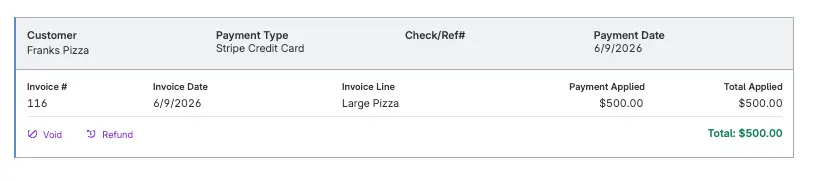
Refunds are a normal part of business. Cleaning up the accounting afterward shouldn’t be.
With Patriot’s new automation, you can refund a customer’s Stripe payment directly from Patriot Accounting. Patriot automatically records the transaction, updates your reports, and keeps your books accurate. Consider the accounting cleanup officially off your to-do list.
Refund payments without the accounting runaround
Go to the customer’s payment history, select Refund next to the Stripe payment, and enter the amount. Patriot creates a dedicated Customer Refund transaction with the correct entries for your accounting method, whether you use cash or accrual accounting.
There’s no need to void the original payment, rebuild the invoice, or create manual journal entries. Your invoice stays intact, and the payment history shows exactly how much was refunded and when.
Your reports get the memo
Refund activity automatically appears throughout Patriot, including:
- General Ledger
- Customer Payment History
- Invoice Status History
- Sales Tax Report
- PDF and CSV report exports
Even failed refunds don’t leave a mess
If Stripe can’t complete a refund, Patriot automatically corrects your books, adds a note to the customer’s payment history, and sends you an email. No mystery transactions. No wondering whether your records match Stripe.
Ready when you need it
Stripe refund functionality is available now to Patriot Accounting customers who accept credit card payments through Stripe. There’s nothing extra to set up.
See how it works in our help article Refunding a Customer Payment.