How to View and Manage Your Company Org Chart
Background
If you use Patriot HR Software, you can view a chart that visually maps your company’s reporting structure. It’s built automatically from the manager and direct and indirect report relationships you set up in Patriot, so you can quickly see who reports to whom, how teams connect, and which employees still need a manager assigned.
How to Use the Employee Organization Chart
- Go to Payroll > Employees > Org Chart
- Designated managers will display with direct and indirect reports.
- If you have not designated managers for your company, see Designate Managers from Unassigned Employees Panel.
- Employees without an assigned manager will appear on the right side of the chart in the Unassigned Employees panel.
- Click the Assign Manager link at the bottom of the employee grid to assign a manager.
- Click the icon on the top right corner of each employee box to view the employee record.
- Download the organizational chart chart by clicking on the the PDF link at the bottom of the page.
Managers and employees will be able to view the their team organizational hierarchy in their portal.
How to Assign Managers from Unassigned Employees Panel
- On the right side of the org chart, find the Unassigned Employees panel. These are employees who need a manager assigned to appear in the organizational hierarchy.
- Click the Manager Settings link located beneath each employee.
- A modal will display.
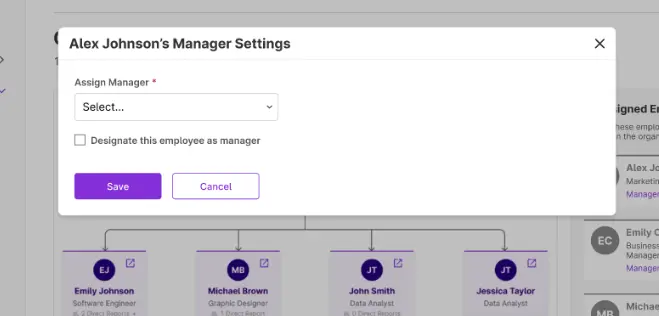
- Click into the Assign Manager drop-down to select the employee’s manager.
- Click “Save.”
How to Designate Managers from Unassigned Employees Panel
- Go to Payroll > Employees > Org Chart
- On the right of the org chart, find the Unassigned Employees panel.
- If your employee has already been assigned a manager you’ll need to go the Manager Settings to indicate they are a manager.
- A modal will display.
- You can add a manager from the Assign manager drop-down or leave it empty.
- Click the “Designate this employee as a manager” box to indicate manager status for this employee.
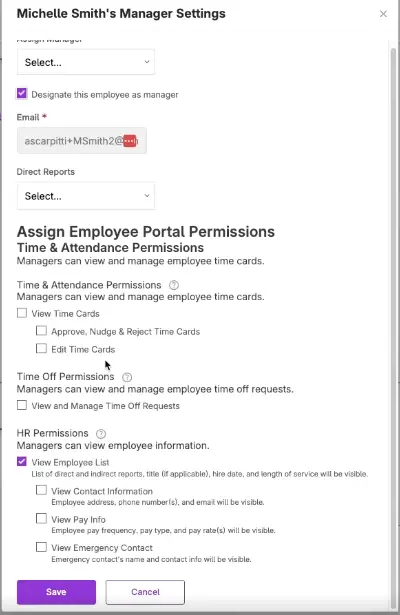
- Assign direct reports by checking employee names from the Direct Reports drop-down.
- Assign permissions that the manager will have access to in their employee portal for their direct and indirect reports.
- Permissions will vary based on the software you subscribe to. To learn more about manager permissions, please see our help article, “How to Add or Remove Manager Permissions,” for more info.
- Click “Save.”
How to Change Employee Portal Visibility of the Org Chart
- Go to Payroll > Employees > Org Chart
- Find the Employee Portal Visibility selection at the top of the Org Chart.
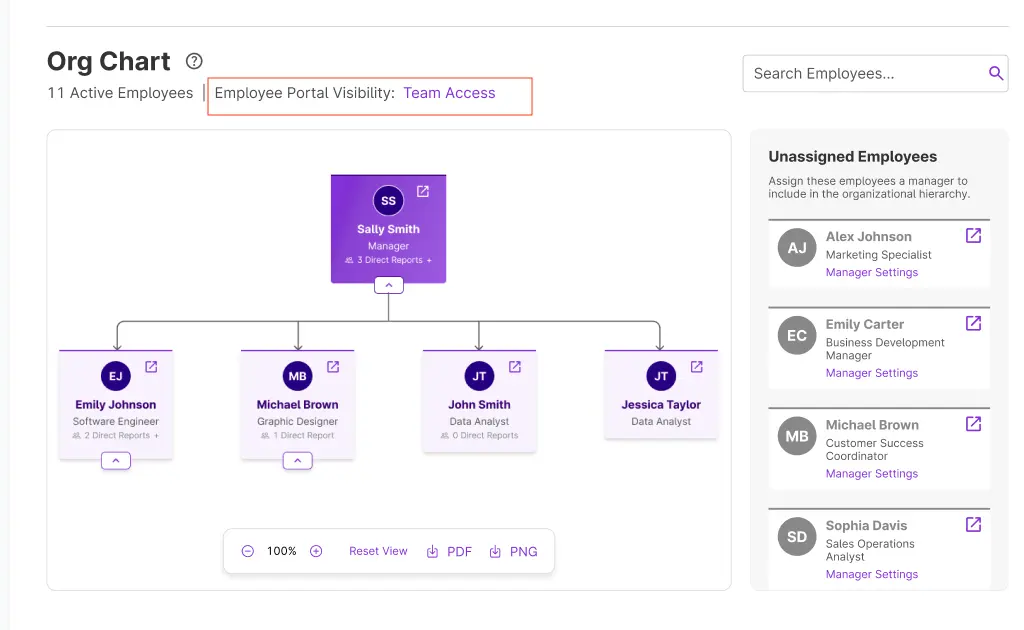
- By default the display for employees will be set to Team.
- Click the link, (e.g. “Team”), to change the display visibility setting.
- A modal will display
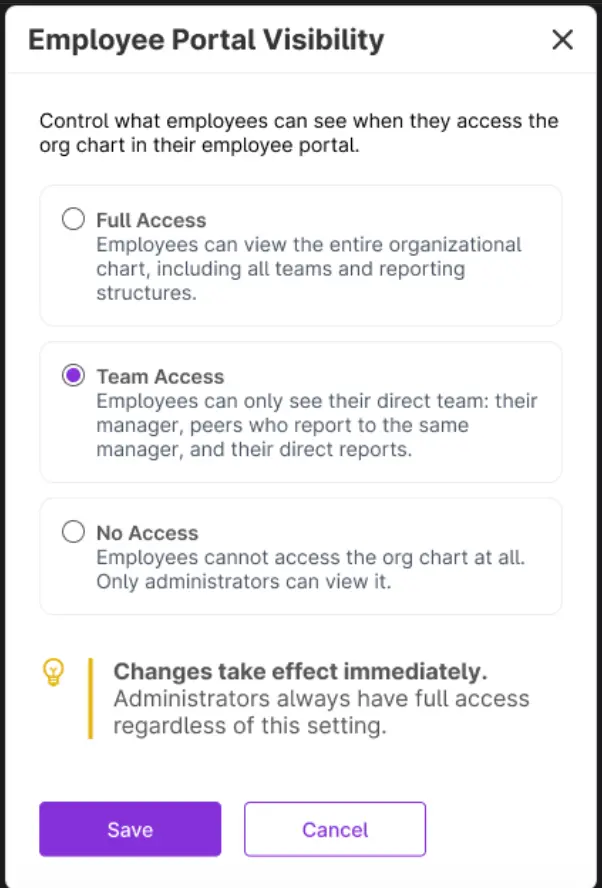
- A modal will display
- Choose the desired access for the org chart by clicking the radio button for one of the three options: Full Access, Team Access, No Access.
- Click Save.
Your feedback will not receive a reply. If you have a specific issue, please reach out to our support team here.