How to Set Up Minnesota Paid Family Medical Leave (PFML) in Payroll
Background
The Minnesota Paid Family Medical Leave is a state-mandated program that provides paid leave for full and part-time employees who need time off for specific family or medical reasons. All employers, regardless of size or unemployment insurance exemptions, are required to participate in Paid Leave with exceptions for employees of tribal nations or the federal government and self-employed individuals who choose to provide their own coverage for themselves. Self-employed individuals and independent contractors can choose to opt into the MN PFML.
Visit the MN PFML website for more info.
| 💡The IRS’s Revenue Ruling 2025-4, states that any excess employer PFML contributions made for an employee are considered an “employer pick-up.” These amounts must be included in the employee’s taxable wages, with required W-2 reporting starting in 2026. In your payroll reports this is called “Employer Additional Contribution.” |
Important Dates for MN PFML
January 2026
- Premiums and deductions begin: The total premium rate for 2026 is 0.88% and includes both a Family Leave and a Medical Leave premium. Employers will contribute a minimum of 50 percent of the total premium, though they may choose to pay up to 100 percent of the premium. Employers will be able to deduct the remainder from employee pay, up to a maximum 50 percent of the premium.
- Patriot’s role: Patriot’s payroll software will calculate MN PFML premium contributions for all liable employees/companies.
April 30, 2026
- The first premiums for MN PFML and filings are due.
- Reporting Period: These reports and premiums are for wages paid to employees between January 1, 2026 – March 31, 2026.
- Patriot’s role: Patriot will calculate MN PFML for all payroll accounts and collect, remit, and file MN PFML premiums for Full Service customers who have completed their tax filing setup.
Who needs to register for MN PFML account?
- For new employers in MN not already registered with UI: You will need to register for a joint UI/PFML account. Third party access will need to be granted to Patriot.
- For existing employers that have SOME employees not covered by UI (aka exempt from unemployment): will also need to register for a Paid Leave Only account and grant Third-party authorization to Patriot. The MN registration page has stated in these situations:
- First account – is your Joint UI/Paid Leave account. This account is used to report your employees who are covered by UI and Paid Leave. For existing employers, the state will automatically set this account up for you.
- Second account – is your Paid-Leave-ONLY account. This account is used to report your employees who are not covered by UI but are covered by Paid Leave. You will need to register for this account.
See the MN PFML website for more details on creating an account.
- Organizations with ALL employees not covered by the Unemployment Insurance program (aka: exempt from unemployment, S-Corp owners): need to set up a Paid Leave Only account on the Unemployment Insurance Minnesota website. Additional technical assistance is available from experienced UI staff for account setup. For more information and to register for a Paid Leave Only account visit the Unemployment Insurance Minnesota website.
How to Setup MN PFML
- Go to Settings > Payroll > Paid Family Medical Leave
- If you operate in more than one state with PFML navigate to the Minnesota tab.
- Answer: Are you considered a small employer and eligible for a reduced premium?
- If Yes –>
- Answer: Are you considered a small employer and eligible for a reduced premium? The software will assign the premium rate based on your answer to this question. If you are a small employer your premium rate is 0.66% of employee wages vs 0.88% of employee wages for those who are not small employers.
- Small employers are those who did not report over 30 MN FTE (full-time equivalent) employees in any of the basis period quarters (between October 1, 2024 and September 30, 2025).
AND
The MN employees’ average wage is less than 150% of the state annual average wage. - Next, determine your employer amount to the percentage you want to contribute.
💡 This is NOT your premium rate but rather how much of the premium rate you are contributing. - You are allowed to assign up to 50% of the cost of the PFML premium to your employee.
- For all new employers without historical pay periods, you should do the following to assist with calculating your employer contribution:
- Count the number of MN employees and use MN’s SAWW (State Average Weekly Wage – currently $1,372/week) for any benefit calculation or eligibility thresholds set by MN PFML.
- If No –>
- Select “No I am exempt.”
- For employers using an approved Equivalent Plan Substitution in place of the state-funded PFML, set the company as “exempt” in the software. In this case, you are responsible for reporting PFML directly to the state.
- Small employers are those who did not report over 30 MN FTE (full-time equivalent) employees in any of the basis period quarters (between October 1, 2024 and September 30, 2025).
- Answer: Are you considered a small employer and eligible for a reduced premium? The software will assign the premium rate based on your answer to this question. If you are a small employer your premium rate is 0.66% of employee wages vs 0.88% of employee wages for those who are not small employers.
- If Yes –>
- Enter the effective date (example 1/1/2026).
- Click “Save.”
- You will see an audit log of all of the changes you have made to the MN PFML at the bottom of the screen in Setting History.
Please reference the Minnesota Paid Leave website for further details and FAQs.
Minnesota Employer PFML Contributions on Employee Pay Stubs
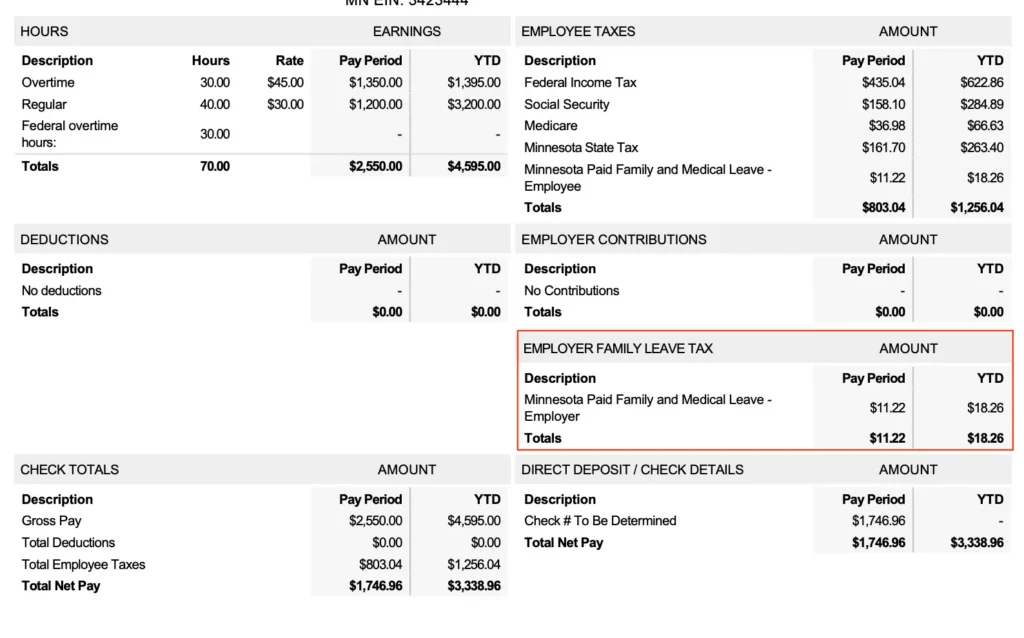
The employer share of Paid Family and Medical Leave on employee pay stubs is displayed, in a section called Employer Family Leave Tax, keeping your pay stub compliant according to Minnesota laws.
Your feedback will not receive a reply. If you have a specific issue, please reach out to our support team here.