Add or Change Your Employee Profile Photo
New Feature!
You can add or update a profile photo in your My Patriot employee portal. Your employer will be able to see your photo in your employee record. Also check out, “How to Add or Edit My Personal Information.”
How to Add a Profile Photo
Follow these steps to add or update your profile photo.
- Log in to My Patriot at mypatriot.com or www.payrolltime.com
- Go to “Personal Information.”
- Click the Upload photo link located under your initials avatar.
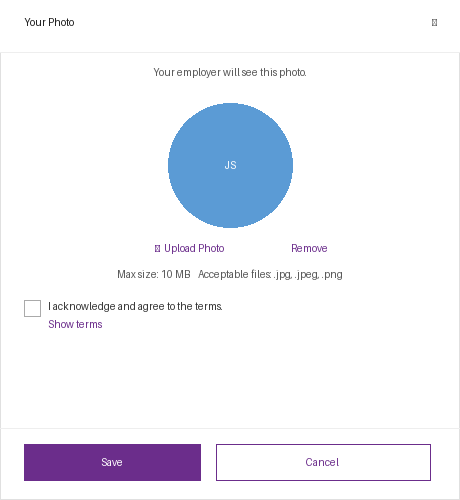
- Choose a photo from your device to upload. Make sure your photo meets these requirements before uploading:
- File types: .jpg, .jpeg, or .png,HEIC and WEBP
- Maximum file size: 10 MB
- Check the box next to I acknowledge and agree to the terms. You can click Show terms to read the full terms before agreeing.
- Click Save.
| 💡 Your employer will see this photo in your employee record once it is saved. |
How to Change Your Profile Photo
Follow these steps to remove your current profile photo.
- Go to Personal Information in your employee web portal.
- Click the Update Photo below your photo.
- Select a new file from your device that will meet the file requirements: File types: .jpg, .jpeg, or .png and Maximum file size: 10 MB
- Check the box to agree to the terms.
- Click Save.
| 💡 Your employer will see this photo in your employee record once it is saved. |
How to Remove Your Profile Photo
- Go to Personal Information in your employee web portal.
- Click the Update Photo link below your photo.
- Click the Remove link.
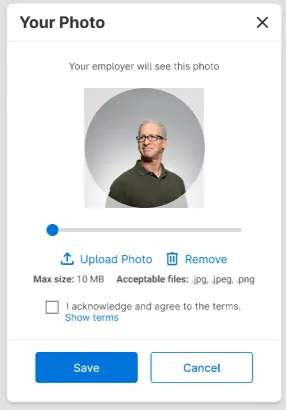
- Click Save.
| 💡After removing your photo, your initials will appear as your avatar instead. |
Error Messages
If your photo does not upload, you will see an error message in the Your Photo window.
- Invalid file type – The photo you selected is not a supported file type. Only .jpg, .jpeg, and .png files are accepted. Choose a different file and try again.
- File exceeds 10 MB – The photo you selected is too large. Reduce the file size to 10 MB or smaller and try again.
- Upload failed – The upload was not successful. Check your internet connection and try again. If the issue persists, try clearing your cache and cookies in your web browser.
Your feedback will not receive a reply. If you have a specific issue, please reach out to our support team here.