Add Washington Workers Comp Codes to Employees
Background
If you are a Washington state employer, you will need to assign a Washington employee workers’ compensation code for each employee in order to run payrolls. Depending on the employee’s rate for each code, the employee will pay a portion of the workers comp premium through payroll deduction.
For more information, see the Employers’ Guide to Workers’ Compensation Insurance in Washington State.
How to Assign a Workers Comp Code to an Employee
- Be sure you have set up your Workers Comp Codes and rates first in your settings. See Washington Workers Compensation (Industrial Insurance) for step-by-step details.
- Go to Payroll > Employees > Employee List > {Employee Name} to add a workers comp code to an employee.
- Click the Pay Info tab.
- Click Edit.
- Click the Yes radio button under the Covered by Workers Comp section.
- Select the Workers Comp Code from the dropdown list for this employee.
- The dropdown shows the codes you added in your company settings.
- If you need to add to this list, set these up at the company level under Payroll > Settings > Payroll Settings > Workers’ Comp Settings.
- Click “Save Employee.”
How to Mark an Employee Exempt from Washington Workers Comp
- Go to Payroll > Employees > Employee List > {Employee Name}
- Click the Pay Info tab.
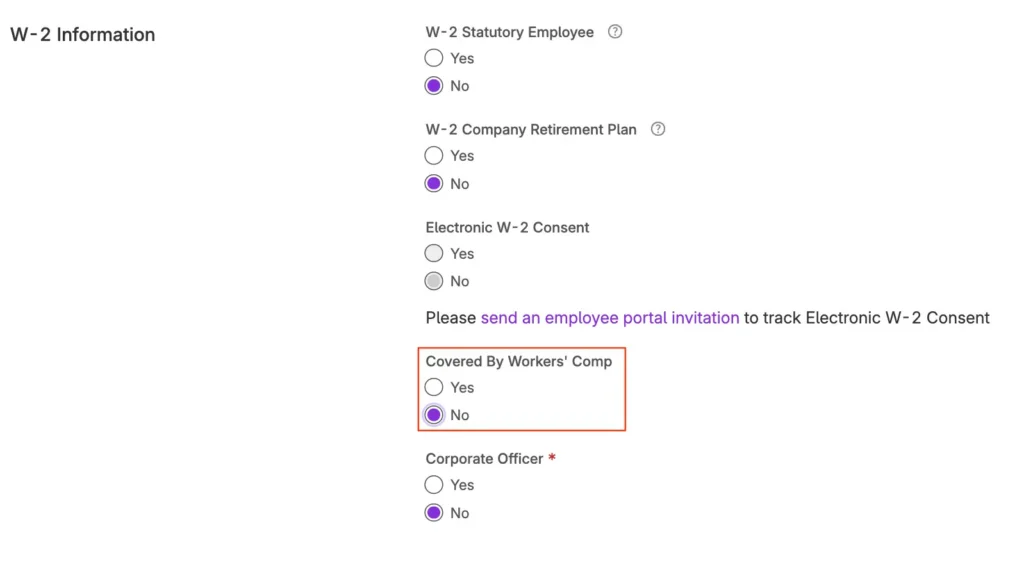
- Find the W-2 Information section.
- Click No under Covered by Workers Comp.
- Click Save.
Related Articles
[DEFINITION: Workers’ Compensation]
A Closer Look at Workers’ Compensation
Your feedback will not receive a reply. If you have a specific issue, please reach out to our support team here.