Pennsylvania Local LST and EIT Payroll Taxes
Background
If you are an employer in Pennsylvania, you will need to withhold and remit local tax on behalf of your employees, based on your company’s location and also your employee’s residence. There is an alphabet soup full of acronyms you’ll need to be familiar with:
EIT – Earned Income Tax: Employees working in Pennsylvania will pay a local Earned Income Tax (EIT). The tax rate is determined by where the employee lives and works. The employee will be taxed by the higher of the two rates.
PSD – Political Subdivision Code: This is a 6-digit number that identifies the location of the township, borough, or city, and will determine the employee’s local tax rate. Based on the addresses that you have entered, the software should automatically select these for you. However, please confirm the PSD code for your own business location, in addition to the PSD code for each employee. You can look up a PSC code on the state’s PSD Codes and EIT Rates page.
LST – Local Services Tax: This is a local tax that only applies to certain locations. Employers in these locations will need to withhold and remit the LST on behalf of employees. All employers with work sites within the taxing jurisdiction are required to deduct the LST from their employees at the site of employment if the tax is listed in the Official Tax Register.
Look Up PA Local PSD Codes and Rates
The software will automatically calculate the correct rates and update them as needed. There is no need to enter a rate in the software. However, you can look up rates on the state’s PSD Codes and EIT Rates page. You will need to enter both the work address and the employee’s home address to find the correct PSD code and see the rate displayed.
What PA Local Tax Rate Is Used?
Generally, this is how local PA taxes rates are assigned:
- LST tax rates are based on the work address. The LST rate shown on the PA local finder is the annual tax amount.
- EIT tax rates are calculated based on the higher of the two (worksite vs employee residence)
| 💡 The software will display the worksite tax in payroll even if the resident tax is higher. This is to correctly show the tax where the payments will be remitted and the filings will be submitted. |
Frequently Asked Questions
As an employer, you are required to register your business with each local tax collector for your PA worksite location(s). You do not need to register your business with the local tax collectors for your employees’ home municipalities—unless you have employees who work from home, thus establishing additional worksite locations. With the exception of Pittsburgh and Philadelphia, all PA local taxes will be remitted and filed to the worksite jurisdiction.
A: EIT is determined by the employee home and work address. The software will calculate the higher EIT rate of the two. The software will display the tax jurisdiction where the EIT taxes will be remitted and filed even if the EIT is the higher rate.
If the LST tax is $10 or under, the entire amount will be calculated on one payroll annually. If the LST tax is over $10, the LST tax may be prorated on payrolls throughout the year. In either case, when the LST limit has been met, the tax will stop being deducted from employee pays.
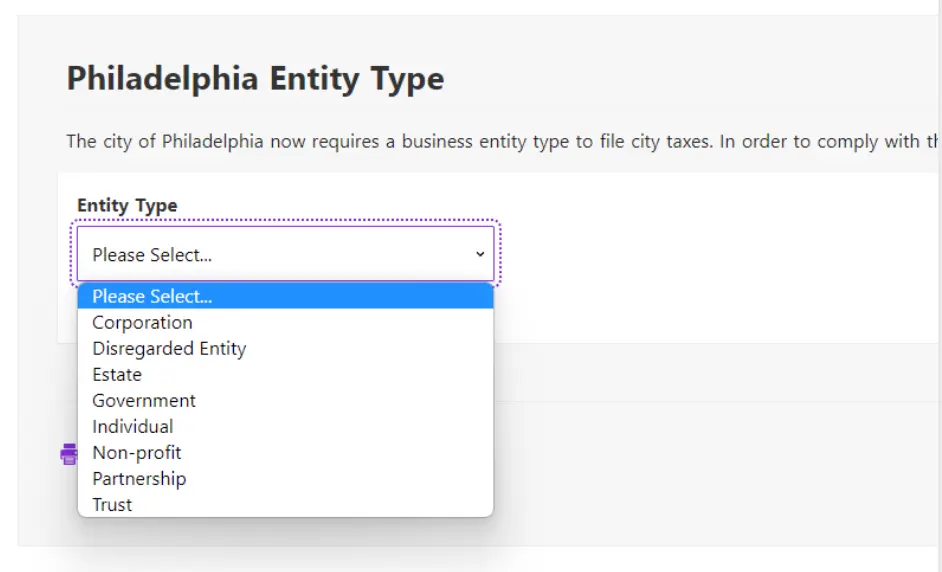
City of Philadelphia Entity Type
Beginning in 2022, the city of Philadelphia requires the user to select an Entity Type. Employers are required to file with Philadelphia if wages are paid to either:
- Residents of Philly (regardless of where they work)
or - Non-residents of Philly that perform services within Philly
You will need to select your company entity type for reporting if you are a Full Service customer.
Your feedback will not receive a reply. If you have a specific issue, please reach out to our support team here.