How to Sign Up and Access the Employee Health Benefits Portal
Background:
If your employer offers group health benefits, they may have gone used SimplyInsured to purchase integrate the benefits with Patriot Payroll. SimplyInsured is a health insurance marketplace and administration platform.
Employees who have employer sponsored health benefits purchased through SimplyInsured will be able to access the health benefit portal for employees to sign up, and elect plans and manage coverage.
How to Enroll in Your Company’s Health Benefits
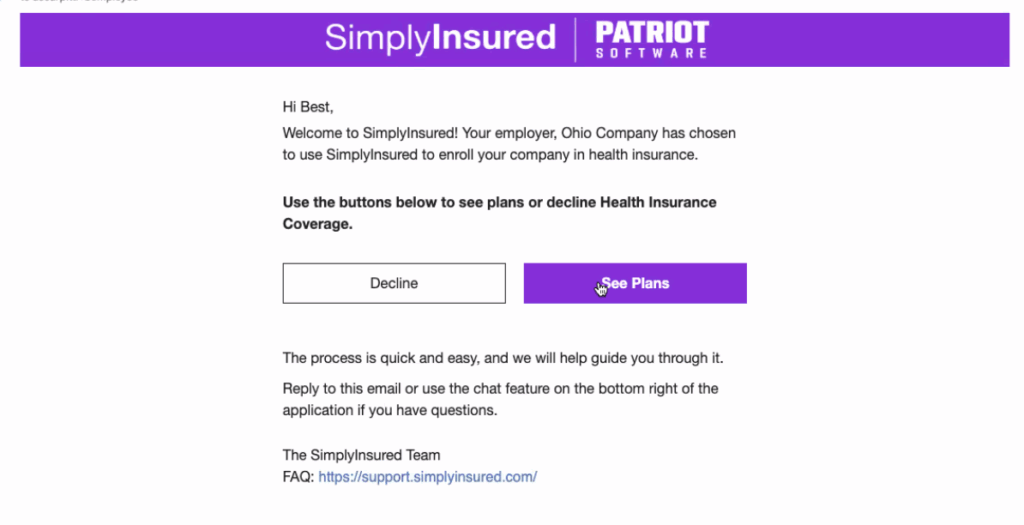
- You will be invited through an email from support@simplyinsured.com to enroll in your company health insurance benefits.
- Click “See Plans”
- You will be taken to the SimplyInsured employee benefit portal where you will create a username and password.
- Go through the steps to complete your health benefit application.
- For more details, please see SimplyInsured’s help article.
How to Access the SimplyInsured Employee Benefit Portal
- Log in to your employee portal www.mypatriot.com
- On the left navigation, click the “Health Benefits” tab.
- A new tab will open to the SimplyInsured employee benefit login.
- If you have problems logging in to the SimplyInsured employee benefit dashboard, please see SimplyInsured’s help articles or contact the SimplyInsured support team.
Your feedback will not receive a reply. If you have a specific issue, please reach out to our support team here.